Roblox Server Status
Is Roblox Down?
“How to check Roblox’s server status and tell a real outage from a problem on your end.”
Last Checked: August 2026
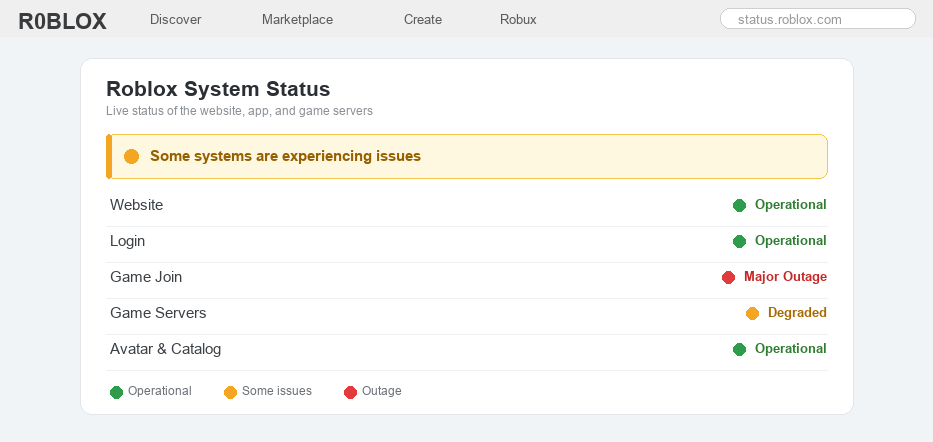
When a game stops loading, it is hard to know if all of Roblox is down, or if the trouble is just on your game, your device, or your internet.
Sometimes Roblox really is down for everybody. The servers can run into problems, or Roblox might be doing maintenance to fix things and add updates.
Other times Roblox is working fine and the problem is on your end, like a weak wifi signal or an app that needs an update.
The good news is there is a quick way to find out which one it is, usually in under a minute, with no guessing.
Well, here is how to check if Roblox is down, what each kind of outage looks like, and what to do while you wait.
The Quick Answer
The fastest way to tell if Roblox is down is to open the official status page at status.roblox.com. Green means everything is working, yellow means some parts are having problems, and red means there is a big outage. If the status page is all green but Roblox still will not work for you, the problem is most likely your device or internet, not Roblox.
How to Check if Roblox Is Down
1
Check the official Roblox status page
The quickest and most trustworthy way is the status page Roblox runs itself.
– Go to status.roblox.com in any web browser; it works on a phone, tablet, or computer
– Look at the colors: green means working, yellow means some users are having trouble, and red means a big outage
– Each part is listed on its own (Website, Login, Game Join, Game Servers), so you can see exactly what is broken
2
Check Roblox’s official social pages
During a big outage, Roblox usually posts an update to let everyone know they are working on it.
– Check Roblox’s official account on X (Twitter) and their other social pages for an outage message
– Only trust posts from the real, verified Roblox accounts, not random people claiming Roblox is “shutting down”
– If Roblox has posted about an outage, you know it is on their side and you just need to wait it out
3
Look at the error code you got
The error message Roblox shows often tells you whether it is a server problem or something on your end.
– Codes like 277, 279, and 529 usually mean Roblox lost the connection or a server had a problem
– Our guides explain each one: Error Code 277, Error Code 279, and Error Code 529
– If lots of players get the same code at the same time, it is almost always an outage on Roblox’s side
4
Find out if it is just you
If the status page is green, the trouble might be on your device or internet, and that is usually an easy fix.
– Try opening another website or app to check that your internet is actually working
– Restart your wifi router, then close Roblox all the way and open it again
– Make sure the app is up to date, and try clearing the cache if it still acts up
5
See if other players are reporting problems
If your internet is fine but Roblox still will not load, it helps to know whether other people have the same trouble.
– Ask your friends if Roblox works for them right now, since that is the fastest way to tell if it is just you
– You can also check a community outage tracker, which is a website where players report problems, to see if reports suddenly jump up
– A big jump in reports from lots of people usually means a real outage, not just your own device
6
What to do while Roblox is down (and a calm note)
If it really is an outage, the best thing to do is simply wait, because only Roblox can fix its own servers.
– Most outages are short and get fixed in minutes to a few hours, so check the status page again in a little while
– Do not delete and reinstall the app over and over, because that will not fix a server outage and you might lose your settings
And do not worry. A short outage or a maintenance break is not the same as Roblox shutting down. The game is not closing, it is just taking a quick break. Feel free to message us if you are still stuck after the status page turns green.
Is Roblox Down FAQ
Is Roblox down right now?
The fastest way to find out is to open the official status page at status.roblox.com. Green means Roblox is working, yellow means some parts are having problems, and red means a big outage is happening. We cannot show live status on this page, so always check the official one for the real-time answer.
How do I check if Roblox is down?
Open status.roblox.com in any browser and look at the colors and the list of services. You can also check Roblox’s official social pages for outage updates, and look at any error code you got, since codes like 277 and 529 often point to a server problem.
Is Roblox down for everyone or just me?
If the official status page is all green, Roblox is most likely working and the problem is on your end, like your wifi or an out-of-date app. If the status page shows yellow or red, or lots of players report the same issue, then it is down for everyone.
Why does Roblox keep kicking me out or saying it cannot connect?
This can happen during an outage, but it is also a common sign of a weak internet connection or an old app. Check the status page first, then restart your wifi and make sure Roblox is updated. Our error code guides walk you through the exact fix for each message.
How long do Roblox outages last?
Most Roblox outages are short, often just a few minutes, and bigger ones are usually fixed within a few hours. Roblox works to bring everything back as fast as it can, so check the status page again after a little while.
Is Roblox shutting down?
No. Roblox is not shutting down. A short outage or a maintenance break means the servers are being worked on for a little while, not that the game is closing. These rumors pop up a lot online, but they are not true, so there is no need to worry.
Need more help?
Roblox keeps an official list of any problems on its status page, and you can get more help in the Roblox Support center. If the status page is green but Roblox still will not load for you, the fix is almost always on your device, like your internet, the app version, or the cache.