Roblox Help Guide
Emote in Roblox
“Wave, cheer, and bust out a dance on PC, mobile, Xbox, and console.”
Last Updated: August 2026
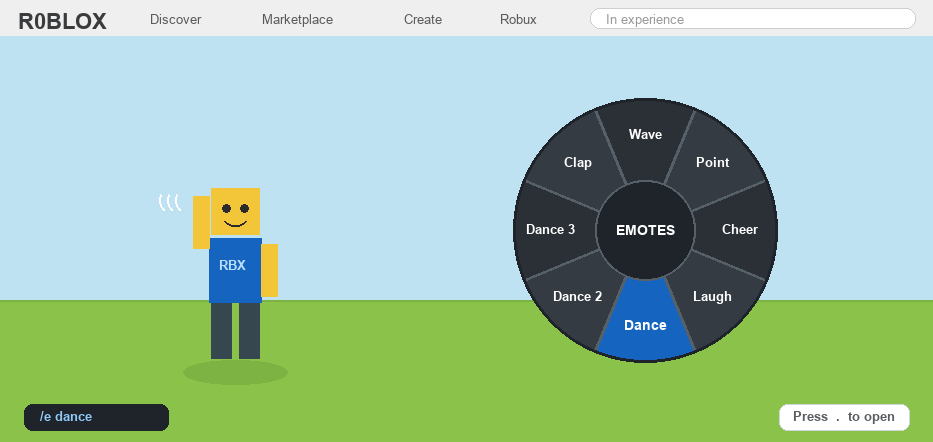
Emotes are the fun little animations your avatar can do in Roblox, like waving hello, cheering, clapping, or busting out a dance.
They are a friendly way to say hi, celebrate a win, or just goof around with friends, all without typing a single word.
Roblox gives everyone a handful of free emotes to start with, and you can grab plenty more from the Avatar Shop. Some of those are free too, and some cost a little Robux.
You pick which emotes you want in your avatar editor first, then you can use them in almost any game that allows emotes.
Well, here is how to emote in Roblox the easy way, on every device.
The Quick Answer
To emote in Roblox, type /e and an emote name in the chat, like /e wave or /e dance. To use the emote wheel instead, first equip emotes in the Avatar editor > Animations > Emotes, then open the emote menu in a game and tap the one you want. Your avatar must be set to R15 (not R6) for emotes to work.
How to Emote in Roblox
1
Set your avatar to R15 first
Emotes only work on the newer R15 body type, not the older blocky R6, so this is the very first thing to check.
– Open the Avatar editor from the menu and look for the Body Type section
– Choose R15 (Rthro counts as R15 too) instead of R6
– If you stay on R6, the emote wheel and most emotes simply will not show up
2
Try the free chat commands (the fastest way)
The quickest way to emote is to type a short command right into the in-game chat box.
– Type /e wave and press Enter to wave, then swap “wave” for others like /e dance, /e cheer, /e laugh, or /e point
– These default emotes are free and built into every account; see our full list of Roblox emotes for all 14 commands and what each one does
– The chat has to be turned on for the commands to work, so check our guide to turning on chat if nothing happens
3
Equip emotes in the Avatar editor
To use the spinning emote wheel, you first choose which emotes go on it.
– Open the Avatar editor, click Animations, then click the Emotes tab
– Tap an emote, then pick one of the 8 slots on the wheel to put it in
– You can mix the free emotes with any extra ones you own, in any order you like
4
Open the emote menu inside a game
Once your wheel is set up, you can use it in almost any experience that allows emotes.
– Look for the emote button (a smiley or little dancing person) in the in-game menu and tap it
– On a computer, you can also press the period key (.) to pop the wheel open
– Click or tap the emote you want, and your avatar performs it right away
5
Get more emotes from the Avatar Shop
Want more than the basics? The Avatar Shop is packed with extra emotes and dances.
– Open the Avatar Shop, then tap the Animations or Emotes section
– Need ideas? Browse our list of the best Roblox emote codes and IDs to preview popular dances before you get them
– Some are free and some cost a little Robux, so always check the price first
– It is a good idea to ask a parent before buying anything, then equip your new emote using Step 3
6
If your emotes are not working (and a quick friendly note)
If the wheel will not open or a command does nothing, a couple of quick checks usually fix it.
– Some games turn emotes off on purpose, especially competitive or roleplay ones, so try a different experience
– Double-check you are on R15 and that chat is switched on for the /e commands
Emotes are just for fun, so keep them friendly and only play and chat with people you actually know. Feel free to message us if your emote wheel still will not budge.
Roblox Emote FAQ
How do I emote in Roblox?
Type /e and an emote name in the chat, like /e wave or /e dance. Or equip emotes in the Avatar editor, open the emote wheel in a game, and tap the one you want.
What are the emote commands in Roblox?
The free built-in commands are /e wave, /e point, /e cheer, /e laugh, /e dance, /e dance2, and /e dance3. Type one into the chat and press Enter, or browse our full list of Roblox emotes to see every command with a description of each.
Why can’t I use emotes in Roblox?
The most common reasons are that your avatar is set to R6 instead of R15, the game has emotes turned off, or chat is disabled so the /e commands will not work.
How do I dance in Roblox?
Type /e dance in the chat for the basic dance, or try /e dance2 and /e dance3 for different moves. You can also equip dance emotes from the Avatar Shop onto your emote wheel.
Are Roblox emotes free?
Roblox gives you several free emotes to start, like wave and dance. Many more in the Avatar Shop are free too, while the fancier ones cost a small amount of Robux.
How do I open the emote wheel?
In a game, tap the emote button in the menu, or press the period key (.) on a computer. The wheel shows every emote you have equipped, up to eight.
Need more help?
Roblox explains its emote and animation system in the Roblox Support help center. If an emote still will not play, make sure your avatar is on R15 and that the game you are in actually allows emotes.