The Skill Builder lets you build your own attack in Jujutsu Shenanigans, using the animations, sounds and hitboxes already in the game. You pick the pieces, set the timing, and the move becomes yours.
This page is the full reference. Every node you can place and every setting inside it. Every condition and property too, plus the exact timings that make the trickier bits fire on their own.
The quick answer
Custom movesets are part of Free Build, so they only work in a private server. Press M to turn on Build Mode, place a Moveset, Awakening, Special or Character Block, then pick Custom from its ability list.
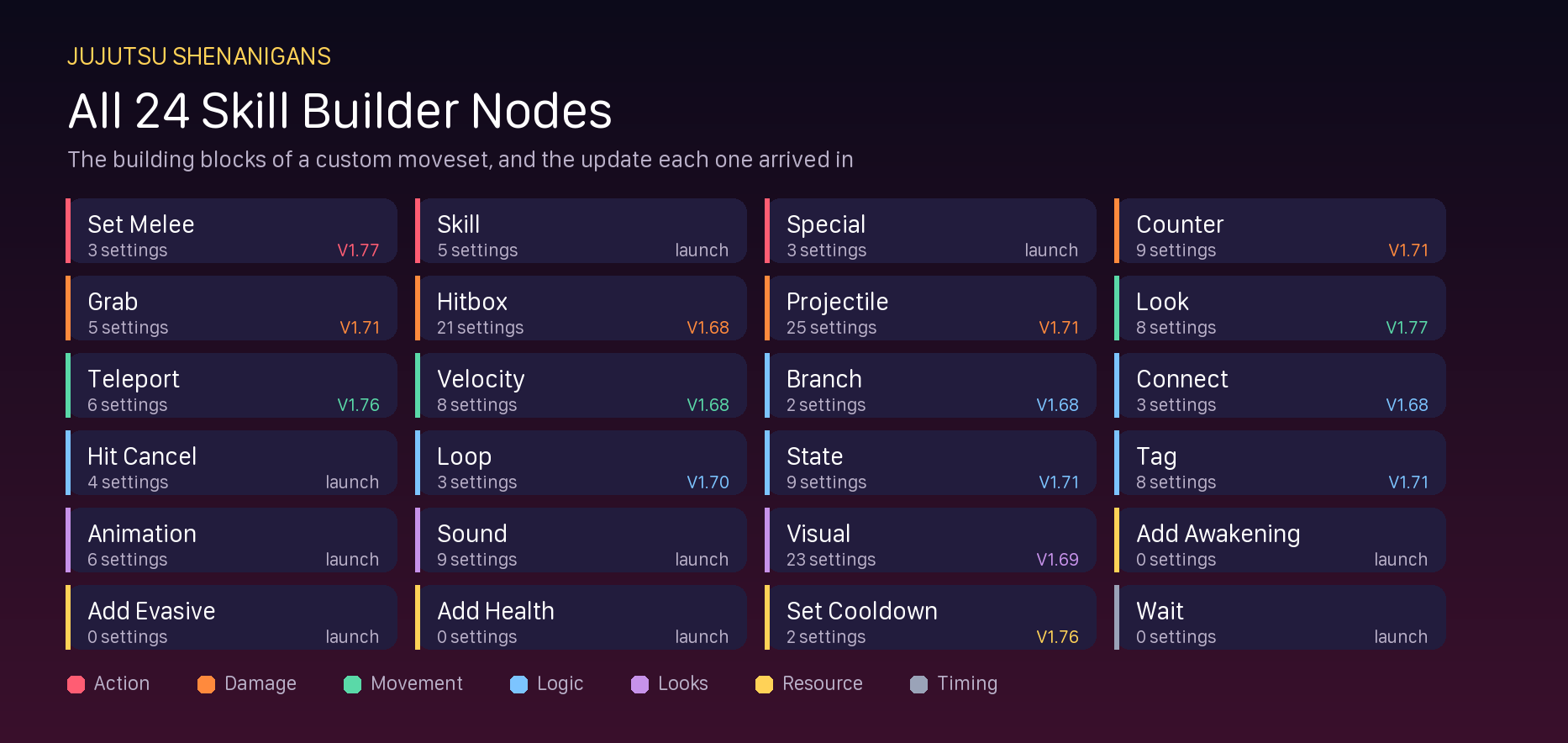
That opens the Skill Builder. You get 24 nodes to build with, 9 conditions to limit when the move can be used, and 13 properties to fine tune it.
The number most people want. To make a Black Flash go off by itself, add a Wait node of 0.3 to 0.4 seconds. It goes straight after Focus Strike, Divergent Fist or Cleave Rush. The same window works for all three.
What you need before you start
There are three things you need, and the last one catches people out.
| What |
Why |
| A private server |
Free Build and the Skill Builder do not run in public matches at all. |
| Build Mode turned on |
Press M inside the private server. Without it you cannot place any blocks. |
| A block to build on |
A Moveset, Awakening, Special or Character Block. The Custom option lives in its ability list. |
The name, cooldown and key bind are not set inside the Skill Builder. You set those on the block menu itself. People often finish a move and then cannot work out why it has no button.
The three tabs
Everything in the Skill Builder sits under three tabs. Knowing which tab does what saves a lot of hunting.
| Tab |
What it is for |
| Timeline |
The move itself. You place nodes in order and they play in that order. |
| Conditions |
Rules about when the move is allowed to be used at all. |
| Properties |
Tweaks to the finished move, like damage, i-frames and where it shows up. |
A move runs on a clock. The timeline only counts nodes under the 150 second limit, which is two and a half minutes and far more than any normal attack needs.
All 24 timeline nodes
These are grouped by what they do. The settings number is how many separate options that node gives you, which is a fair guide to how fiddly it is.
Action nodes (3)
| Node |
What it does |
Settings |
Added in |
| Set Melee |
Changes which melee hit you are on. |
3 |
V1.77 |
| Skill |
Plays any skill in the game, from any character. |
5 |
Launch |
| Special |
Plays any special in the game. |
3 |
Launch |
Damage nodes (4)
| Node |
What it does |
Settings |
Added in |
| Counter |
Turns on a counter stance with no animation of its own. |
9 |
V1.71 |
| Grab |
Sticks a target to you once you land a hit. |
5 |
V1.71 |
| Hitbox |
Makes an area that hurts anyone standing in it. |
21 |
V1.68 |
| Projectile |
Makes a hitbox that travels instead of staying still. |
25 |
V1.71 |
Movement nodes (3)
| Node |
What it does |
Settings |
Added in |
| Look |
Points your camera in a direction. |
8 |
V1.77 |
| Teleport |
Moves you somewhere instantly. |
6 |
V1.76 |
| Velocity |
Pushes or pulls you while the move is running. |
8 |
V1.68 |
Logic nodes (6)
| Node |
What it does |
Settings |
Added in |
| Branch |
A second timeline inside the same move, with its own rules. |
2 |
V1.68 |
| Connect |
Sends a signal to a Connect Block in your build. |
3 |
V1.68 |
| Hit Cancel |
Checks if you have hit anyone, and stops the move if you have not. |
4 |
Launch |
| Loop |
Repeats the nodes above it a set number of times. |
3 |
V1.70 |
| State |
Puts a state on you, such as invincible or stunned. |
9 |
V1.71 |
| Tag |
Marks you with a label the move can check later. |
8 |
V1.71 |
Looks nodes (3)
| Node |
What it does |
Settings |
Added in |
| Animation |
Plays an animation on its own, with no attack attached. |
6 |
Launch |
| Sound |
Plays a sound from a Roblox audio ID. |
9 |
Launch |
| Visual |
Adds an effect you can see, like a flash or a shockwave. |
23 |
V1.69 |
Resource nodes (4)
| Node |
What it does |
Settings |
Added in |
| Add Awakening |
Fills part of your Awakening bar. Starts at 5%. |
0 |
Launch |
| Add Evasive |
Fills part of your evasive bar. Starts at 5%. |
0 |
Launch |
| Add Health |
Adds or takes away health. Starts at 5. |
0 |
Launch |
| Set Cooldown |
Puts one of your other moves on cooldown. |
2 |
V1.76 |
Timing nodes (1)
| Node |
What it does |
Settings |
Added in |
| Wait |
Adds a pause before the next thing happens. |
0 |
Launch |
Three nodes hold most of the system. Projectile has 25 settings, Visual has 23 and Hitbox has 21. That is 69 of the 162 options in the whole builder, packed into 3 of the 24 nodes. Learn those three and the rest are quick.
How the Skill Builder grew
The Skill Builder arrived in V1.57 and got a big rebuild in V1.60, which is when specials were added. It has kept growing since.
Only 9 of the nodes were there at the start. The other 15 were added later, which is most of the toolset.
| Update |
Nodes added |
Which ones |
| V1.57 |
9 |
Wait, Skill, Special, Animation, Sound, Add Awakening, Add Health, Add Evasive, Hit Cancel |
| V1.68 |
4 |
Velocity, Connect, Hitbox, Branch |
| V1.69 |
1 |
Visual |
| V1.70 |
1 |
Loop |
| V1.71 |
5 |
Projectile, Grab, Counter, Tag, State |
| V1.76 |
2 |
Set Cooldown, Teleport |
| V1.77 |
2 |
Look, Set Melee |
V1.71 was the biggest single drop, adding five nodes at once. A guide written before that update is missing 9 of the 24 nodes you have now.
All 9 conditions
Conditions decide when a move is allowed to run at all. Each one is a switch with a true and a false setting, and flipping it reverses the check.
| Condition |
What it checks |
| In Air |
Whether you are on the ground or in the air. |
| Is Jumping |
Whether you are holding the jump button. |
| Has Target |
Whether a valid target is in sight under your cursor. |
| Is Awakened |
Whether you are in base form or awakened. |
| Has Awk Bar |
Compares your Awakening bar with a number you pick. Starts at 5%. |
| Durability |
Not a check. Gives the move a set number of uses, then deletes it. Starts at 1. |
| Is In Domain |
Whether you are inside a domain. |
| Has Health |
Compares your health with a number you pick. |
| Is Holding |
Whether you are holding the key bind down. |
Durability is the odd one out. It is not a rule about when you can use the move. It gives the move a number of uses and then deletes it for good. It starts at 1, so turning it on without raising the number leaves you with a single use.
Conditions work on branches as well as on the whole move. That is how one custom move can do different things in the air and on the ground.
All 13 properties
Properties change how the finished move behaves. Most are simple switches.
| Property |
What it does |
| Damage Multiplier |
Multiplies the whole move’s damage by a number you pick. |
| Knockback Multiplier |
Multiplies the whole move’s knockback by a number you pick. |
| Invincible |
Gives you i-frames for the whole move. |
| Replace Skill if Occupied |
Lets the move take a slot that already has a move in it. |
| Prevent Override |
Stops other moves from taking this one’s slot. |
| Hide in Awakening |
Hides the move while you are awakened. |
| Keep When Moveset Switches |
Keeps the move when you swap between base and Awakening. |
| Hide in Base |
Hides the move while you are in base form. |
| Use When Obtained |
Fires the move the moment you get it. |
| Use On Death |
Fires the move when you die. |
| No Stun |
Turns off skill checks on the move. |
| No Cancel |
Makes the move impossible to interrupt. You can still be ragdolled. |
| Variant Tag |
Lets the move run with no cooldown while the tag you name is active. |
Making a Black Flash fire by itself
Some skills have hidden variants. If you give them the right amount of time, they turn into a stronger version on their own. A Black Flash is the one everybody wants.
The trick is a Wait node. Place the skill, then place a Wait node after it, and set the time to land inside the window below.

| Skill |
Wait node time |
Notes |
| Focus Strike |
0.3 to 0.4 seconds |
The most common one |
| Divergent Fist |
0.3 to 0.4 seconds |
Same window |
| Cleave Rush |
0.3 to 0.4 seconds |
Same window |
| Brute Force |
0.6 to 0.7 seconds |
Triggers off Earthquake |
| Idle Transfiguration |
0.75 to 1 second |
Triggers off Focus Strike, and shifts with how far away the target is |
Three of the five share the same 0.3 to 0.4 second window. Learn that one timing and you can Black Flash off any of them. Enable Variants must be switched on in the Skill node, or none of this works.
If you want the timing for a Black Flash in normal play rather than a built move, that is a different skill entirely. Our how to Black Flash guide covers the manual version.
Other variant timings
Black Flash is not the only variant you can set off with a Wait node. These are the rest, and a few of them behave in stages.
| Skill |
Trigger |
Timing |
| Reserve Balls |
Shutter Doors |
0.01 – 1 |
| Toad |
Nue |
0.3 – 0.4 (Nue still gets summoned, but you are able to prohibit this by placing a Cancel 0.2s after it) |
| Body Repel |
Focus Strike |
TBA (can be 0.7s) |
| Revolve |
On its own |
<1s (actual limit TBA) |
| Veilstep |
On its own |
No Wait Time needed. Set an immediate Cancel after one if you desire the other. |
| Garuda Rebound |
On its own |
1.27 – 1.53 (2.47 – 2.73 if held) |
| Rika Downslam/Slam/Haymaker |
True Love Beam |
0.6 |
Revolve, Reversal Red and Rapid Punches are worth a mention. They do not just switch on or off. The wait time you pick decides how much of the move plays, so small changes give quite different results.
Tips that save you time
Use the default branch as a hub
Branches act like separate timelines inside one move. Keep the default branch as a simple starting point, then send the move off to other branches. That is much easier to fix later than one long timeline.
Grabbed targets cannot be hurt normally
When you grab someone they stop taking damage. To get round it, use an Add Health node with a negative amount. You can also finish with a Branch that checks their health and lands a Hitbox.
Start a blockable move with a check
If your move opens with an attack that cannot be blocked, add a Hitbox and a Hit Cancel node. If the hit lands, the move carries on. If it was blocked, the move stops instead of leaving you standing there.
Counters need a Wait after them
A Counter node switches off the moment the move ends. Put a Wait node after it so the counter stance actually stays up long enough to catch something.
Heavy Visual effects, and Mesh ones in particular, can slow the game down badly for everyone in the server. Build the shortest version that works, then add the pretty parts.
Jujutsu Shenanigans custom moveset FAQ
How do you make a custom moveset in Jujutsu Shenanigans?
Join a private server, press M for Build Mode, place a Moveset, Awakening, Special or Character Block, then choose Custom in its ability list. That opens the Skill Builder.
Can you use custom movesets in public servers?
No. Custom movesets are part of Free Build, which only runs in private servers. You cannot take a built move into a normal match.
How do you get a Black Flash in a custom move?
Put a Wait node of 0.3 to 0.4 seconds straight after Focus Strike, Divergent Fist or Cleave Rush. Make sure Enable Variants is switched on too.
How many nodes are in the Skill Builder?
There are 24. Nine came with the Skill Builder in V1.57 and the other 15 were added in later updates.
Why does my custom move have no key bind?
The name, cooldown and key bind are set on the block menu, not inside the Skill Builder. It is the most common thing people miss.
How long can a custom move be?
The timeline counts nodes up to 150 seconds. That is two and a half minutes, so length is rarely the thing holding a move back.
What does Durability do?
It gives the move a set number of uses and then deletes it permanently. It starts at 1, so turning it on without raising the number leaves you with one use.
Why did my counter stop working straight away?
A Counter node ends when the move ends. Add a Wait node after it so the stance stays up long enough to catch an attack.
More for Jujutsu Shenanigans