Last Updated: August 2026 | Tutorials, publishing rules and player numbers checked against the live game.
Studio Lite is a game about making games. It hands you a simpler version of the tools Roblox developers actually use, and the whole thing runs on a phone. You drag parts into place, pull ready-made models out of a catalogue, and write real code in a small editor with its own keyboard. Six built-in lessons walk you through it. If you get far enough, you can put what you made on your own Roblox profile for other people to play.
This page covers those six lessons and how many people finish each one, the rules around publishing that catch almost everybody out, and the link between this game and Growing Up. It also covers why there is nothing to buy in here at all.
Studio Lite Overview
| Studio Lite Overview |
| Game Name |
Studio Lite |
| Type |
A game-making tool you use inside Roblox, built for phones |
| Genre |
Sandbox and simulation |
| Developer |
ScottSpiritWalker, a verified developer working alone |
| Goal |
Build a game, then put it out for other people to play |
| Players |
One. Every server holds a single person |
| Money |
Nothing to spend. Robux only comes back to you, from builds you publish |
| Codes |
None, and there is no shop for one to pay into |
| Gamepasses |
None at all, in four years |
| Badges |
Six, one for each tutorial |
| Hardest Badge |
The last coding lesson, finished by about 28,000 people |
| Linked Game |
Growing Up, by the same developer |
| Visits |
Over 130 million |
| Favorites |
177,463 |
| Rating |
About 87 percent of votes are likes |
| Record Players At Once |
2,125 on 14 February 2026 |
| Typical Visit |
Under 8 minutes |
| Release |
19 September 2022 |
| Last Update |
1 July 2026 |
How to Play Studio Lite
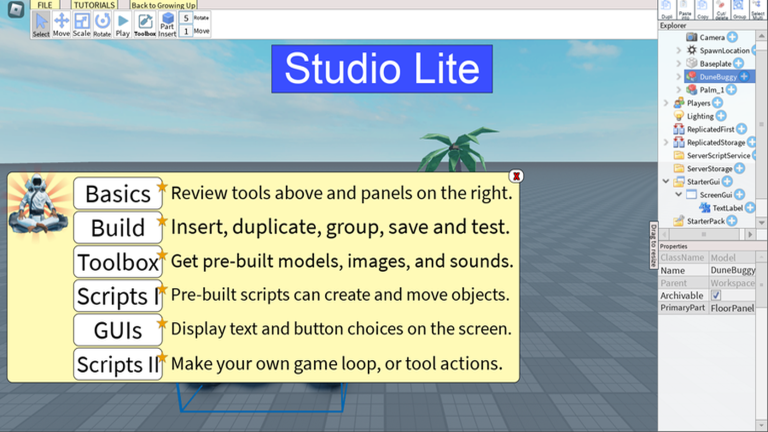
- Start with the Basics lesson. It shows you the row of tools along the top and the two panels down the right, which is where everything in this game lives.
- Learn the four buttons that matter first: Select, Move, Scale and Rotate. Almost all building is those four used over and over.
- Open the Toolbox and drop something in. There are finished models in there made by other people, including a jetpack and a working kill brick, and they cost nothing.
- Press Play to test. This game separates building from playing, so nothing you built is really working until you have tried it.
- Open a pre-built script and change one number in it. That is the Scripts I lesson, and it is far less frightening than starting from an empty page.
- Save often. Your build lives in your own copy of the game and some actions cannot be undone.
- Sort out publishing before you finish something. It does not work on a new account until the requirements are cleared.
Studio Lite Gameplay: Building, Testing and Publishing
Every server in this game holds one person. There is nobody to race, nobody to beat and no chat. You are alone with a grey baseplate and a set of tools.
The screen is split three ways. Tools run along the top, the Toolbox opens on the left, and the right side shows a list of everything in your game with a panel underneath for changing whatever you have picked.
Code is typed in a small editor with a custom keyboard, because a normal phone keyboard makes brackets and quotes painful. The sample scripts are written by the developer with a comment on nearly every line explaining what it does.
Publishing is the last step and the one people trip on. When you first open the game it tells you plainly that what you make can only be played by you, and that publishing stays switched off until the account requirements are sorted. Doing that early saves a lot of frustration later.
The Six Lessons, And Where People Give Up
This game has six badges and every one is a tutorial you finished. There is nothing for turning up, so none of these numbers is padded by people who opened it once and left.
They were also all created on the same day, which makes them fair to compare. No lesson had a head start on any other.
| Tutorial |
People who finished it |
What that tells you |
| Basics |
1,857,407 |
The build tools and the panels down the sides. Treat this as the starting line |
| Build |
190,709 |
Insert, duplicate, group, save and test. Only about 1 in 10 of the people above got this far |
| Toolbox |
117,968 |
Pulling in ready-made models, images and sounds. Six in ten of that group carried on |
| Scripts I |
69,416 |
Using and changing code somebody else already wrote |
| GUIs |
23,663 |
Text and buttons on screen. The lowest of the six, even though it is not the last lesson |
| Scripts II |
28,282 |
Writing your own loops and conditions. More people finish this than the lesson before it |
The cliff is right at the start. About 1.86 million people finished the first lesson and only 191,000 finished the second, so roughly nine in ten stop after the introduction. Anybody who gets past that point tends to keep going: six in ten carry on to the Toolbox lesson, and six in ten of those reach the first coding one.
End to end, about 28,000 people out of 1.86 million have written their own loop. That is around one and a half in every hundred who started.
There is one real surprise in the list. The lesson on putting text and buttons on screen sits fifth, before the harder coding one, yet fewer people have finished it. More players write their own code than finish the lesson about the interface, so that one is being skipped rather than failed.

Nothing Here Is For Sale
In four years and 130 million visits, this game has never put a single thing up for sale. No passes, no coins, no membership. There is no way to spend Robux in it at all.
That is worth saying out loud, because it is close to unheard of at this size. Most games this popular have a shop by their first birthday.
Robux does move through it, just in the other direction. The game says that a build you publish earns, gets voted on and gets checked exactly like any other game on Roblox, so whatever it makes belongs to whoever built it.
The Growing Up Connection
The same developer made Growing Up, a life simulator that has passed 665 million visits and is by far the bigger of the two.
In that game your character ages, and at age 20 there is a college class. To pass it you come here and do tutorials. There is even a button in the corner of this game marked Back to Growing Up.
How many tutorials is worth checking for yourself. The game page says one is enough to pass the class, while the welcome message inside the game says Growing Up players should complete three to advance. Both come from the developer, so do the third one if you want to be sure.
It is an unusual bit of design either way. A life sim sends you into a real build tool to pass a school subject, and you come out able to make something.
How Busy It Is Now
Because every server holds one person, a thousand players means a thousand separate people each building alone. There is no crowd anywhere in this game.
The busiest it has ever been was 2,125 at once, on the fourteenth of February 2026. Its best day in the last month reached 2,025, which is within 5 percent of that record.
That makes it unusual among games this old. Most are a shadow of their best year by now. This one is still sitting at roughly its own high point, almost four years in, and it was last updated in July 2026.
It has also never renamed itself. Most games bolt an update label onto their title every few weeks. In nearly four years of saved copies of its page, this one has always just been called Studio Lite.
Codes and Scripts
There are no codes, and with no shop there is nothing for one to pay out. Our Studio Lite codes page covers what is free instead.
Scripts need care in this game more than most, because it can publish under your name. Our Studio Lite script page has the one worth running and why the popular ones are not.
Tips for New Studio Lite Players
- Do the first two lessons in one sitting. Nine in ten people stop after the first, and the second is where it starts making sense.
- Do not skip the lesson on text and buttons, even though most people do. It is the one thing standing between a pile of parts and something that feels like a game.
- Change somebody else’s script before writing your own. Every sample in here is commented line by line by the developer.
- Use the Toolbox early. There is no prize for building a car from scratch when a working one is two taps away.
- Get publishing sorted before you finish a build, not after.
- Play Growing Up if you want a reason to keep going. The tutorials here count towards its college class.
- Save before you try anything risky. Some actions cannot be undone.
Studio Lite FAQ
Can you really publish a game from Studio Lite?
That is what it is built for. The game says a published build earns Robux, collects votes and gets checked like any other game on Roblox. It does not work straight away though, so see the next answer.
Why can nobody else play my game?
Publishing starts switched off. The welcome message says your builds can only be played by you until the moderation and Terms of Service requirements are resolved, and there are a few one-time steps to clear that.
How many tutorials do I need for Growing Up?
The game page says one tutorial passes the age 20 college class. The welcome message inside the game says three. Do three if you want to be certain.
How many badges are there?
Six, one for each tutorial. There is no badge for joining, so every one of them is somebody who actually finished a lesson.
How hard is the last lesson?
About 28,000 people have finished it out of 1.86 million who did the first, which is roughly one and a half in every hundred.
What does it cost?
Nothing. It has never sold a single item in four years, and there is no way to spend Robux inside it.
Do I need a phone?
No, but it was designed for one. It has its own on-screen keyboard for typing code, which is the part normal phone keyboards handle badly.
How many people play it?
Around a thousand at once, each alone in their own server. Its record is 2,125, set in February 2026.
Is it still being updated?
Yes. It was last updated in July 2026, and it is busier now than at almost any point in its life.