Roblox Help Guide
Refunds on Roblox
“What you can get back, what you can’t, and how to ask.”
Last Updated: August 2026
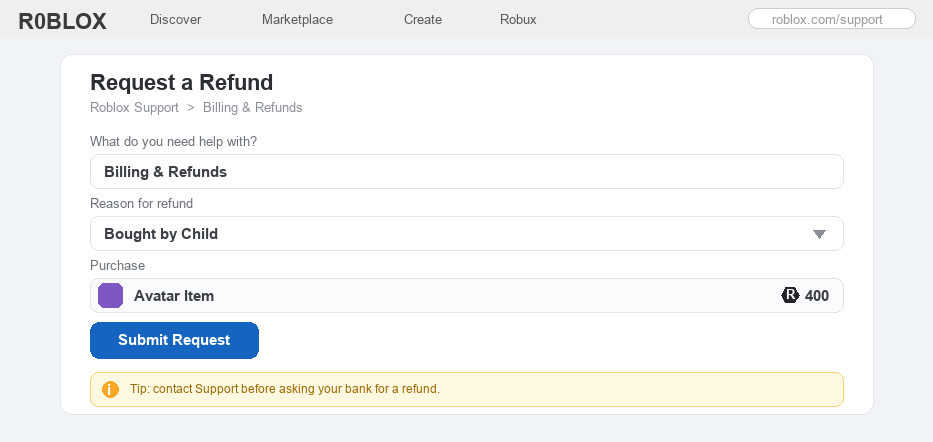
Spent Robux on something by mistake, or had a younger brother or sister buy something by accident? You might be hoping to get a refund on Roblox.
Here is the honest answer most pages will not give you straight: Roblox does not refund most purchases. Robux and the items you buy are usually final.
That said, there are a few real situations where you can get money or Robux back, like a purchase made through an app store, or one a child made by accident.
There are also lots of fake “refund” websites that are really just scams, so it helps to know the safe, official way to ask.
Well, here is exactly what can and cannot be refunded on Roblox, how to ask the right way, and how to stay safe while you do it.
The Quick Answer
Most Roblox purchases cannot be refunded. Robux and virtual items are usually final, so you will not get them back just for changing your mind. You can only get money back in a few cases: Robux bought through an app store (ask Apple, Google, Xbox, or PlayStation), or a purchase that was accidental, made by a child, or not made by you (contact Roblox Support and pick the Billing & Refunds topic). Always contact Support before asking your bank to reverse a charge, and never trust a website that offers to “refund your Robux,” because those are scams.
Before you act: do not ask your bank first
If a charge was wrong, it is tempting to ask your bank or card company to reverse it right away. Try not to do that first. Starting a payment dispute (called a chargeback) can actually block Roblox from giving you a refund, and the account can even be banned for owing money. Always contact Roblox Support first and let them sort it out. You can still go to your bank later if Support cannot help.
How to Refund a Roblox Purchase
1
Know what can and cannot be refunded
Before anything else, it helps to know the honest truth about Roblox refunds.
– Robux and most items you buy are final; Roblox usually will not give them back just because you changed your mind or do not like an item
– You can only get money or Robux back in a few specific cases, shown in the chart below
– The good news: if a purchase was a mistake, made by a younger child, or not made by you, there is often a way to fix it
 A quick guide to what is refundable: app-store, accidental or child purchases, and hacked-account charges can often be fixed, while changing your mind is usually final and any “refund” website is a scam.
2
Bought Robux through an app store? Ask that store
If you bought your Robux or a membership through an app store or console, that company handles the refund, not Roblox.
– This covers buys made through Apple’s App Store, Google Play, Xbox, PlayStation, the Microsoft Store, Meta Quest, Samsung, or Amazon
– Open your purchase history in that store and ask for a refund there, within their refund window (it is usually only open a short time, so act fast)
– For example, on Google Play you open your order history, pick the purchase, and request a refund
3
Accidental or child purchase? Contact Roblox Support
If the purchase was made on the Roblox website with a card and it was a mistake or made by a child, Roblox Support is the place to go.
– Go to Roblox Support and choose the Billing & Refunds help topic
– Pick the reason that fits, such as Bought by Child or an unauthorized charge, and clearly explain what happened
– Remember to contact Support first; as the box above explains, asking your bank before Roblox can block the refund
4
Game passes and paid games work differently
Things you buy from a game, like a game pass, are made by a creator, so the refund rules are a little different.
– Roblox usually will not refund a game pass or an item you bought inside a game, so the place to ask is that game’s creator (some developers can refund from their own tools)
– If you paid real money just to play a game (called paid access), there is a short refund window of about a day or two if you change your mind quickly
– To stop a membership from charging you again, you cancel it rather than refund it (here is how to cancel a membership)
5
Bought something after your account was hacked?
If someone got into your account and spent your Robux, that counts as an unauthorized purchase.
– First, get your account back and lock it down so the hacker is out
– Then contact Roblox Support, explain that your account was hacked, and ask them to look at those purchases
– Turning on extra security afterward helps stop it from happening again
6
Avoid refund scams and prevent mistakes (most important)
This is the part that keeps your account and your family’s money safe, so never skip it.
– There is no magic refund website or tool; anyone promising to “refund your Robux” if you log in or pay a fee is a scam
– Never share your password or login codes to “get a refund”; real refunds only happen through Roblox Support or your app store
– Roblox shows a confirm pop-up before each purchase, and a parent can set spending limits and a PIN, so accidental buys are easy to prevent (see keeping Roblox safe for kids)
– Always ask a parent before buying anything, and ask them to help if you need a refund
Roblox Refund FAQ
Can you refund items on Roblox?
Usually no. Robux and the items you buy are final, so Roblox will not refund them just because you changed your mind. Refunds only happen in special cases, like Robux bought through an app store, or a purchase that was accidental, made by a child, or unauthorized.
How do I get my Robux back?
If you bought the Robux through an app store like Apple or Google, ask that store for the refund. If a purchase on the Roblox site was accidental or made by a child, contact Roblox Support and pick the Billing & Refunds topic. There is no simple “refund” button inside Roblox itself.
Can I get a refund if I bought something by accident?
Often yes, especially if it was a “bought by child” or unauthorized purchase. Contact Roblox Support, explain what happened, and ask for the unused item or Robux back. Always reach out to Support before asking your bank, or the refund can be blocked.
How do I refund a game pass on Roblox?
Roblox usually will not refund a game pass, because a creator made it. You can ask that game’s developer, since some can refund from their own tools. Games you pay real money just to play (paid access) have a short refund window of about a day or two.
Are Robux refundable?
Generally no. Almost all Robux purchases are final, except where the law requires a refund or the charge was unauthorized. If you bought the Robux through an app store, that store may still refund you within its own window.
Is there a Roblox refund website or tool?
No. Any website or app that offers to “refund your Robux” is a scam, and you should never share your password with it. Real refunds only come from Roblox Support or the app store you bought from.
The bottom line
Most Roblox purchases are final, so the best plan is to buy carefully. When a refund is possible, it is in a few clear cases: Robux bought through an app store (ask that store), or a purchase that was accidental, made by a child, or unauthorized (contact Roblox Support and pick Billing & Refunds). Always reach out to Support before your bank, never trust a “refund” website, and ask a parent for help. For the official rules, see Roblox’s own Help Center.