Roblox Help Guide
Join a Group on Roblox
“Find a community, hit Join, and start earning group perks.”
Last Updated: August 2026
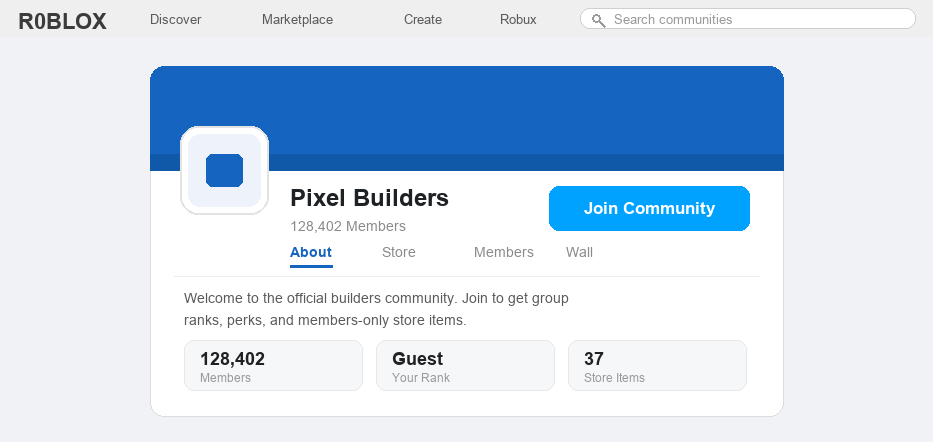
Joining a group on Roblox is one of the easiest ways to connect with players who share your favorite games, creators, and styles. Groups are where fan clubs, clothing stores, and developer teams all live.
One thing trips people up in 2026: Roblox now labels groups as “Communities” in most menus. The name changed, but it is the same feature, and most players still call them groups.
The good news is that joining is free and usually instant. You search for the community, open its page, and press a single button to become a member.
A few communities ask the owner to approve new members first, so those take a little longer. We will cover that case too.
Well, here is the quick version, then the full step-by-step for both PC and mobile.
The Quick Answer
To join a group on Roblox, log in, search for the community by name, open its page, and click the blue Join Community button. It is free, and you are added instantly unless the group is set to manual approval, in which case the owner accepts your request first.
How to Join a Group on Roblox
1
Log in on any device
Groups work the same on the website, the desktop app, and the mobile app, so use whatever you have handy.
– On a computer, open roblox.com or the Roblox app and sign in
– On a phone or tablet, open the Roblox app and sign in
– Make sure you are on the account you actually want to be in the group
2
Find the community
You need the group’s page, and there are a few easy ways to reach it.
– Type the community’s name into the search bar and look under the Communities results
– Open a friend’s or a creator’s profile and check their Communities list
– Or open a game made by the group and tap the group name shown on its page
3
Open the community page
Tap or click the community to open its main page, where all the group info lives.
– You will see the group name, member count, and tabs like About, Store, and Members
– Take a second to confirm it is the right one, since group names can be copied
4
Press the Join Community button
This is the actual join step, and it is a single button.
– Click the blue Join Community button near the top of the page
– On mobile it sits just under the group banner
– If the button changes to show you are a member, you are in
5
Wait for approval if the group asks for it
Some communities use manual approval, so you request to join instead of joining on the spot.
– After you press Join, your request is sent to the group owner
– The button will show that your request is pending
– You become a member once an admin accepts you, which can take minutes or days
6
Start using your group perks
Once you are in, membership unlocks the fun part.
– Climb the ranks by staying active, since owners promote members over time
– Grab members-only clothing and gear from the group store, which you buy with Robux
– Many experiences hand out special perks or boosts just for joining their community
If a community will not let you join, feel free to message us and we will help you figure out why.
Joining a Roblox Group FAQ
Is it free to join a group on Roblox?
Yes. Joining any community is completely free, and you never need Robux to become a member. You only spend Robux if you later choose to buy items from that group’s store.
Why is it called a Community instead of a group now?
Roblox renamed groups to “Communities” across its menus, but it is the exact same feature. Most players, search results, and game pages still call them groups, so you will see both words used.
How many groups can I join on Roblox?
You can be a member of up to 100 communities at once. If you hit that limit, leave a group you no longer use before joining a new one.
Why can’t I join a group right away?
That community is set to manual approval, so the owner has to accept your request first. The button will show “Pending” until an admin approves or declines you.
Can I join a group from inside a game?
Yes. Many experiences now pop up a prompt asking you to join their community while you play, and you can tap Join right there without leaving the game.
How do I leave a Roblox group?
Open the community page, click the three-dot menu near the Join button, and choose Leave Community. You can rejoin later as long as the group still accepts members.
Want the official rules?
Roblox explains finding and joining communities in its Roblox Support help center, and you can manage every group you are in from your account’s Communities page. If a Join button is missing, update the app, since the Communities layout is still rolling out by region.