Catalog Avatar Creator Commands: All 23 and How to Use Them
Catalog Avatar Creator lets you try on almost any item and build outfits. Chat commands make it even easier. They can switch your body type, copy your avatar or move you to a quiet server.

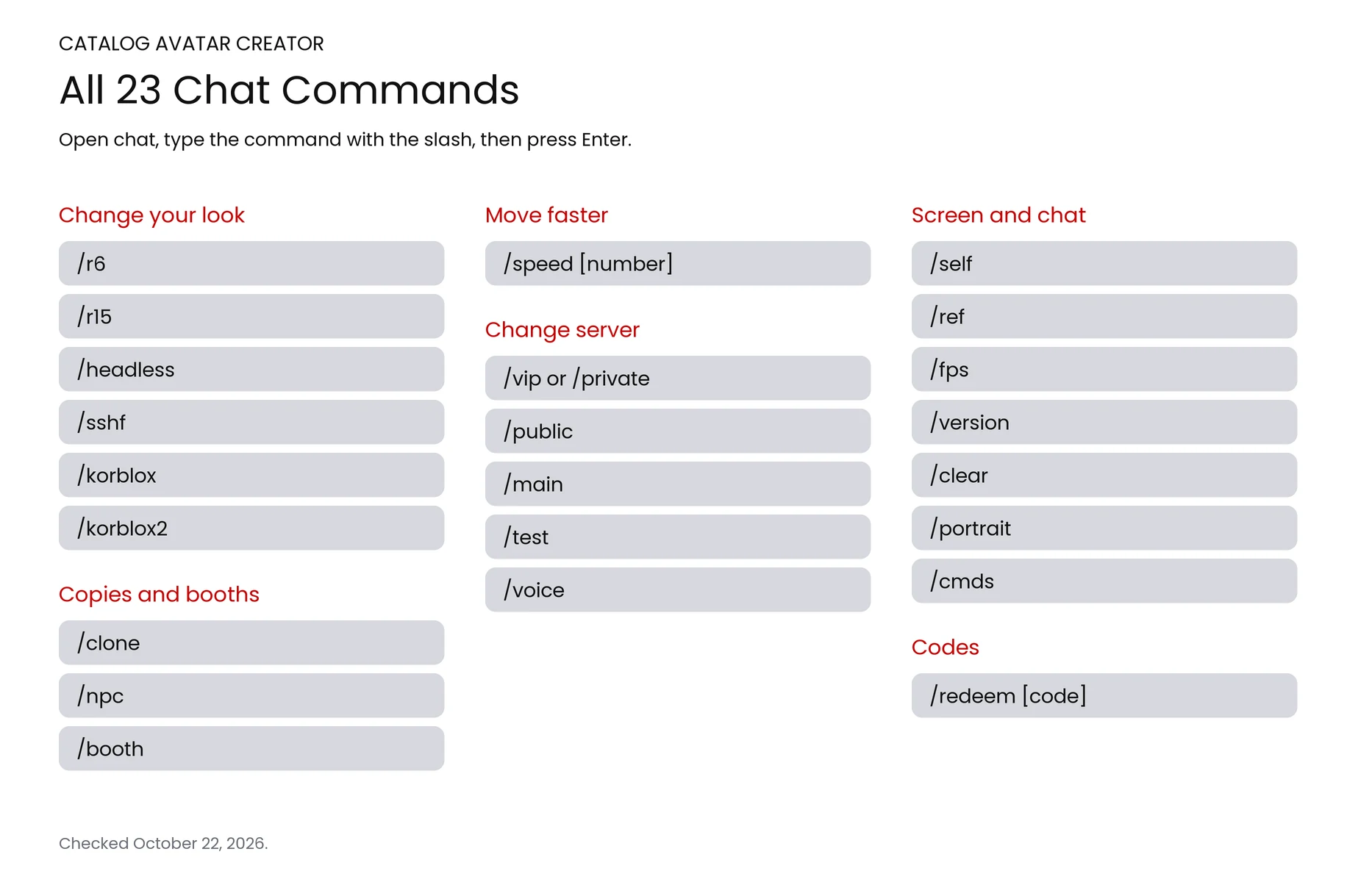
This page lists all 23 commands and what each one does. It also shows how to switch between R6 and R15 and how to find an item ID. Checked on October 22, 2026.
Open the chat, type a command with the slash in front, and press Enter. Type /r6 or /r15 to switch your body. Type /cmds to see the list inside the game.
How to use a command
- Open the chat. Tap the chat icon at the top left, or press / on a computer.
- Type the command with the slash in front, like /r15.
- Press Enter. It works right away.
All the commands are free. Some need a number after them, like /speed 50.
Every Catalog Avatar Creator command
Here are all 23, sorted by what they do.
Commands that change your look
| Command | What it does |
|---|---|
| /r6 | Turns your avatar into the classic blocky R6 body. |
| /r15 | Turns your avatar into the newer, smoother R15 body. |
| /headless | Turns the headless look on or off. |
| /sshf | Turns the Super Super Happy Face on or off. |
| /korblox | Turns the Korblox right leg on or off. |
| /korblox2 | Turns the Korblox left leg on or off. |
Copies and booths
| Command | What it does |
|---|---|
| /clone | Makes a copy of your avatar that stands still. |
| /npc | Makes a copy of your avatar that walks around by itself. |
| /booth | Puts up a booth with text you can change. |
Moving faster
| Command | What it does |
|---|---|
| /speed [number] | Sets how fast you walk. Try /speed 50. |
Commands that change your server
| Command | What it does |
|---|---|
| /vip or /private | Sends you to a private server where nobody else can join. |
| /public | Sends you to a public server. |
| /main | Sends you back to the main game. |
| /test | Sends you to the test server. Most players skip this one. |
| /voice | Sends you to a voice chat server. |
Screen and chat
| Command | What it does |
|---|---|
| /self | Shows your own profile. |
| /ref | Shows your avatar reference. |
| /fps | Shows or hides your FPS number. |
| /version | Shows or hides the game version label. |
| /clear | Clears the chat. |
| /portrait | Turns on portrait mode for phones. Most players skip this one. |
| /cmds | Shows the list of commands in the game. |
Codes
| Command | What it does |
|---|---|
| /redeem [code] | Uses a promo code. Codes are case-sensitive. |
Five commands send you to a different server, so you leave the one you are in. Most players skip /test and /portrait.
Try the headless and Korblox looks for free

Two of the most famous looks on Roblox cost a lot. In the Avatar Shop, the headless look comes from the Headless Horseman bundle. The Korblox leg comes from the Korblox Deathspeaker bundle.
| Command | Shop bundle | Bundle price |
|---|---|---|
| /headless | Headless Horseman | 31,000 Robux |
| /korblox | Korblox Deathspeaker | 17,000 Robux |
That is 48,000 Robux together. In this game, /headless and /korblox let you try both looks for free. It is only a try-on, so nothing is added to your account.
How to switch between R6 and R15
R6 is the classic blocky body with 6 parts. R15 is the newer body with 15 parts, so it bends more. Type /r6 in chat for the old body, or /r15 for the new one.
Some clothes and animation packs fit one body better than the other. If an outfit looks wrong, try switching.
How to find an item ID
Every Roblox item has an ID number. Open the item in the Avatar Shop on the Roblox website and look at the link. The ID is the number right after "catalog/".
For example, the Super Super Happy Face lives at roblox.com/catalog/494291269. So its ID is 494291269.
Resizing and moving an accessory is done in the editor, not with a command. Pick the item, then adjust it there.
How to use codes
Codes use a command too. Type /redeem, a space and then the code. Codes care about capital letters, so copy them exactly. Our Catalog Avatar Creator codes page lists the ones that work right now.
Frequently Asked Questions
Quick answers from this guide.
01How many commands are in Catalog Avatar Creator?
There are 23. Type /cmds in the game to see them.
02How do you get R6 in Catalog Avatar Creator?
Type /r6 in chat. Type /r15 to go back.
03How do you go headless?
Type /headless in chat. Type it again to turn it off.
04How do you get a private server?
Type /vip or /private. Nobody else can join it.
05Do commands cost Robux?
No. Every command is free.
- Catalog Avatar Creator explains how the game works.
- Catalog Avatar Creator codes for any free rewards.
- Catalog Avatar Creator script if you want to see what is out there.
More guides
Keep going with these.
Leave a comment