✅ Last Updated: August 2026 | Verified this week
Build with Voxels is a Roblox creative building sandbox by the verified group Toro_king Studios, where you spawn onto a flat plane and build whatever you want from hundreds of different blocks. You open the backpack to browse the full block palette, place and stack voxels however you like, and your builds auto-save in private servers, so a project you start today is still waiting when you come back.
The game launched in January 2026 and has crossed 57 million visits with more than 3.4 million favorites. This wiki covers how to play, the block palette and the build loop, the auto-save and private-server notes, the most useful tips for new builders, and the most-asked questions, plus links to the codes and scripts pages at the bottom.
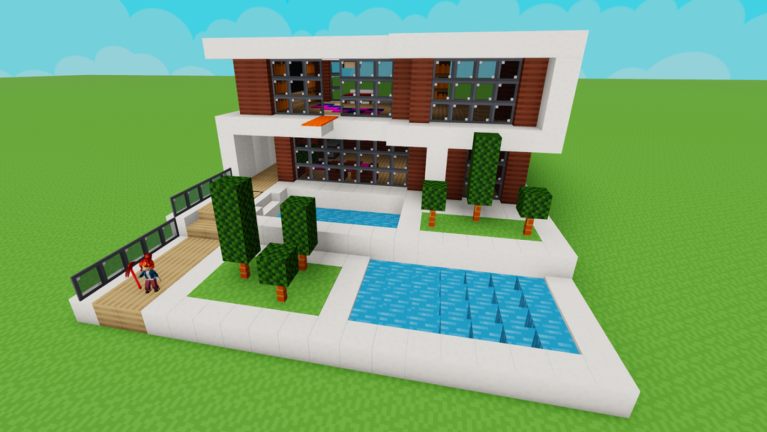
Build with Voxels Overview
| Build with Voxels Overview |
| Game Name |
Build with Voxels |
| Developer |
Toro_king Studios (verified group) |
| Genre |
Simulation / Sandbox (Creative Building) |
| Platform |
Roblox (PC, Mobile, Console) |
| Max Players |
32 |
| Release |
January 2026 |
How to Play Build with Voxels
- Open Build with Voxels on Roblox and spawn onto the flat plane. For a project you want to keep, start in a private server so it auto-saves.
- Open the backpack to see the block palette. The backpack icon holds hundreds of block types, so browse it before you start to know what you have.
- Place your first blocks against the flat plane. The plane works as a free grid for keeping walls straight and floors level.
- Block out the rough shape with plain blocks first, then go back and swap in the detailed block types.
- Stack and layer to add height, building floor by floor for towers, terrain, or tall structures.
- Log off from a private server and your build is saved, ready to pick up where you left off next time.
Build with Voxels Gameplay: Blocks, the Flat Plane, and Auto-Save
The heart of Build with Voxels is one open idea: a flat plane and a backpack full of blocks. You browse hundreds of block types, place and stack them to make whatever you can picture, and shape the world with no objective pushing you along. There is no timer, no score, and no win condition, just an open canvas and the tools to fill it. The flat starting plane doubles as a grid, so it is easy to keep walls straight and rooms square as you go.
What sets the game apart from a quick build-and-leave sandbox is that your work sticks around. Builds auto-save in private servers, so a big project carries over between sessions and you are not starting from scratch each time you log in. That makes it a good fit for ambitious builds you come back to over days, and with up to 32 players per server you can build alongside friends and tour each other’s creations as they grow.
Toro_king Studios carries a verified badge, a strong signal for steady moderation and kid-friendly content, and the focus stays on free creativity rather than paywalls. Every block and the full plane are yours from the moment you spawn, so there is nothing to grind or buy before you can build, and the sibling codes page tracks whether the dev ever adds cosmetic or seasonal code rewards. The whole experience is about what you make, not about unlocking the tools to make it.
Tips for New Build with Voxels Players
- Build in a private server when it matters. Builds auto-save in private servers, so start anything you want to keep there instead of on a public one.
- Open the backpack first. The backpack holds hundreds of block types in one place, so browse the palette before you start to plan around what is available.
- Use the flat plane as a grid. Line your first blocks up to the plane to keep walls straight and floors level, then let the rest of the build follow.
- Block out before you detail. Lay the rough shape with plain blocks to get the proportions right, then swap in the fancier blocks once the structure is settled.
- Think in layers for height. Voxels stack cleanly, so build towers and terrain floor by floor rather than trying to place everything at once.
- Come back to big projects. Because private-server builds save, you can spread an ambitious build across several sessions instead of rushing it in one.
Build with Voxels FAQ
What kind of game is Build with Voxels?
Build with Voxels is a Roblox creative building sandbox by the verified group Toro_king Studios. You spawn onto a flat plane and build whatever you want from hundreds of different blocks in the backpack. There is no objective, score, or win condition, just an open canvas, and builds auto-save in private servers. The game launched in January 2026.
How do you save your build in Build with Voxels?
Builds auto-save in private servers, so if you want a project to carry over between sessions, start it in a private server rather than a public one. There is nothing to press: the game keeps your private-server build for you, so you can log off and pick it up where you left off next time.
Is Build with Voxels free to play?
Yes, Build with Voxels is free to play on Roblox and works on PC, mobile, and console. Servers hold up to 32 players. Every block and the full building plane are available from the moment you spawn, with nothing to grind or buy before you can start building.
How many blocks are in Build with Voxels?
There are hundreds of different block types, all found by opening the backpack icon. Browsing the full palette before you start is the easiest way to plan a build, since you can pick the blocks that fit the look you want and mix plain blocks for structure with detailed ones for finishing.
Are there codes for Build with Voxels?
There are no codes for Build with Voxels right now, since the dev has not added a code box and a creative sandbox has no currency or shop for a code to pay into. If that changes, the working codes and the redeem steps will be on the Build with Voxels Codes page, which we update the day a code is confirmed.
Are there scripts for Build with Voxels?
No working public script targets Build with Voxels. The game has no cash, no farm, and no combat, so there is nothing for an exploit to automate, and the tools that show up are made for a different game or are universal hubs. The full status is on the Build with Voxels Scripts page.
MORE FOR BUILD WITH VOXELS
Looking for freebies? Check the Build with Voxels Codes page for the live code status this month.
Wondering about scripts? Read the Build with Voxels Scripts page for the full status on free executor utilities for this game.