Roblox Game Guide
How to Combo in The Strongest Battlegrounds
“What buttons do I press to chain hits, uppercut, and pull off a wall combo?”
The Strongest Battlegrounds is a fighting game based on One Punch Man. Two or more players punch, dash, and block until one is knocked out. The players who win most fights are not always the ones with the best character. They are the ones who know how to combo.
A combo is a string of hits you land in a row so the other player cannot fight back. It sounds hard, but it is built from a few simple moves that every character shares. Once you learn the controls and one key trick, you can start chaining hits right away.
This guide covers the controls, the M1 chain, how to uppercut and downslam, wall combos, blocking, and your Awakening. Want to know which fighter to pick first? See our tier list. You can also grab free rewards on the codes page.
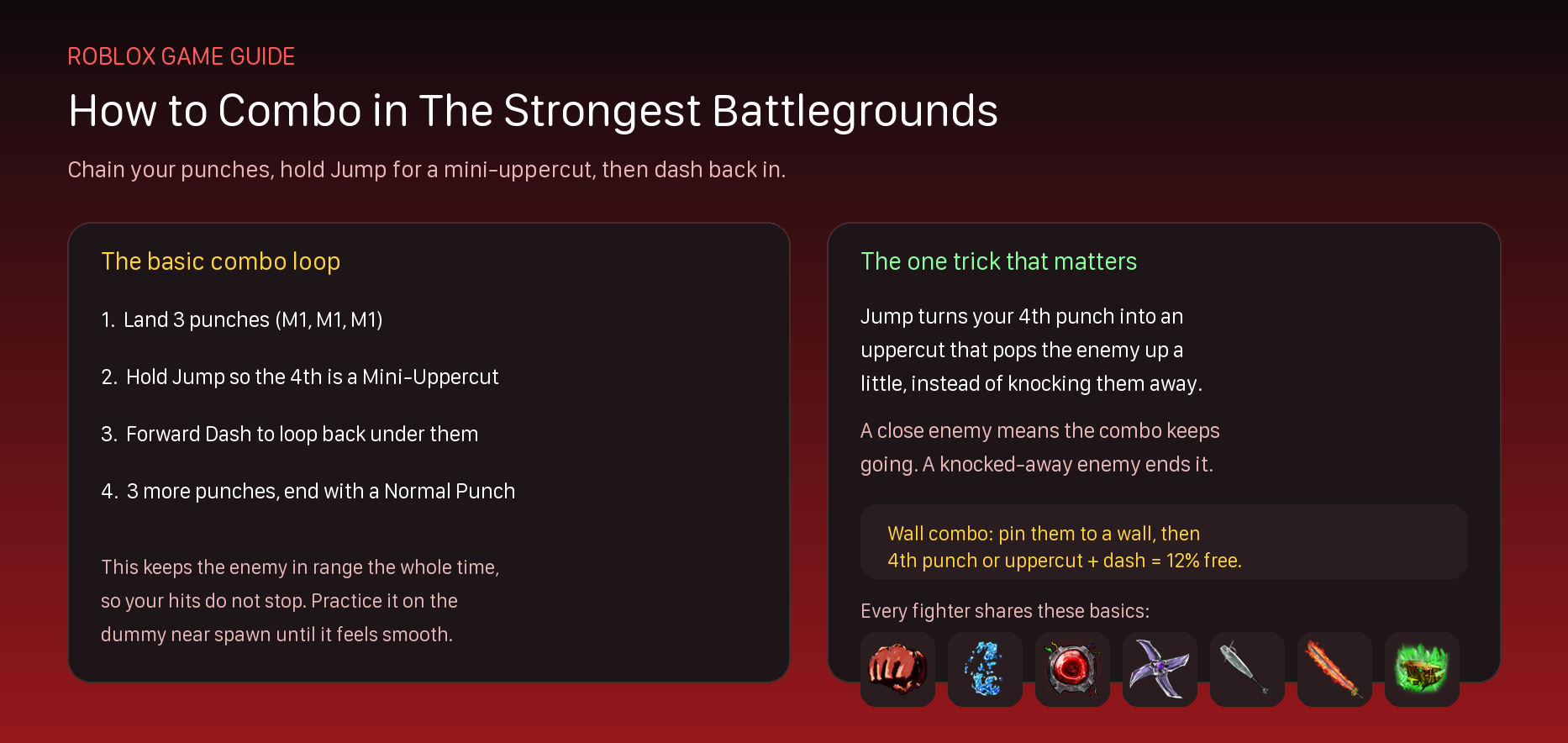 The basic combo loop, plus the one trick that keeps every combo going.
The Quick Answer
A combo is just hits landed back to back. Here is the short version:
- Land 3 punches by clicking your attack button three times.
- Hold Jump so your 4th punch becomes a Mini-Uppercut that pops the enemy up.
- Forward Dash back under them, then punch again.
That loop is the heart of almost every combo in the game. The one thing to remember is that Jump turns your 4th punch into an uppercut, which keeps the enemy close so your hits do not stop.
The Controls You Need First
Every character uses the same basic controls, so you only have to learn them once. Here is the full list for PC and mobile. Console players use the same on-screen buttons, with the dash on the Y button.
| What it does |
PC |
Mobile |
| Move around |
W, A, S, D |
Left joystick |
| Basic attack (M1) |
Left Click |
Attack button |
| Use a skill |
1, 2, 3, 4 |
Skill buttons |
| Dash |
A direction plus Q |
A direction plus Dash button |
| Block |
F |
Block button |
| Uppercut or Downslam |
Hold Jump (Space) |
Hold the Jump button |
| Open emotes |
B |
Emote button |
Those four skill keys (1, 2, 3, and 4) are your special moves. Each character has four of them, and they change into stronger versions when you go into your Awakening.
 The full PC control sheet, plus the cooldowns on every dash and the wall combo.
The M1 Chain (Your Basic Combo Starter)
M1 just means your basic punch, done with Left Click on PC or the attack button on mobile. When you hold your attack, your character throws up to four punches in a row. This four-hit string is where nearly every combo begins.
A full four-punch string always deals 14% damage. Here is how that adds up, and why the last punch matters most:
| Punch |
Damage |
What it does |
| 1st punch |
3% |
Starts the string |
| 2nd punch |
3% |
Keeps it going |
| 3rd punch |
4% |
Sets up the finisher |
| 4th punch |
4% |
Knocks the enemy down (ragdoll) if you do nothing special |
That last punch is the key. If you just let it happen, it knocks the enemy far away and your combo ends. But if you press the right button first, you can turn it into something better. That is the next part.
Tip: In Settings you can set M1 Mode to Hold (hold the button to keep punching) or Tap (press once per punch). Tap gives you more control over when your 4th punch lands, which helps with combos.
How to Uppercut and Downslam
This is the most important trick in the whole game. Both moves use the Jump button during your punch string. They change your 4th punch so your combo can keep going instead of ending.
- Mini-Uppercut: Hold the Jump button while you punch, then land your 4th punch. Instead of knocking the enemy away, you pop them straight up a little. They stay close, so you can dash in and keep hitting.
- Downslam: Jump into the air, then press your attack while you are up there. You slam the enemy down into the ground. A downslam also gives you Armour for a moment, which means punches cannot stop you.
The Mini-Uppercut is the one you will use the most, because a popped-up enemy is easy to chase. The Downslam is great for ending a combo or setting up a wall combo. Both work on every character, so practice them until they feel natural.
How to Read a Combo
Players share combos using a short code. It looks confusing at first, but it is easy once you know the words. Here is what each part means:
| You might see |
It means |
| 3m1 or 3 M1 |
Throw three basic punches |
| Mini Uppercut |
Hold Jump so your 4th punch pops them up |
| Downslam |
Jump and attack in the air to slam them down |
| Front Dash or Fdash |
A forward dash to close the gap |
| Side Dash |
A dash to the left or right |
| Normal Punch |
A plain 4th punch to finish |
| Tech |
A community trick that links moves together |
So a combo written as “3m1 + Mini Uppercut + Front Dash + 3m1 + Normal Punch” just means: three punches, hold Jump to pop them up, dash back in, three more punches, then a plain finish. Now you can read almost any combo you find.
Your First Combo, Step by Step
Here is a simple combo that works with any character. It does not use fancy tricks, so it is perfect for learning. Try it on the training dummy near spawn first.
- Throw 3 punches. Click your attack three times.
- Hold Jump and punch again for a Mini-Uppercut. The enemy pops up.
- Forward Dash straight at them as they come down.
- Throw 3 more punches once you are close again.
- Finish with a Normal Punch or one of your skills.
That is a real combo. Once it feels smooth, you can add a skill after the uppercut, or end near a wall for a wall combo. Small steps add up fast.
Dashes and How to Escape a Combo
Dashing is how you start combos, dodge attacks, and get out of trouble. You dash by holding a direction and pressing Q (or the dash button on mobile). There are three kinds, and they do not all share the same cooldown.
| Dash |
Input (PC) |
Cooldown |
Good for |
| Forward Dash |
W plus Q |
5 seconds |
Closing in and starting combos |
| Side Dash |
A or D plus Q |
2 seconds |
Dodging and escaping |
| Back Dash |
S plus Q |
5 seconds |
Backing off safely with Armour |
The Side Dash has the shortest cooldown, so it is your best escape tool. It also works even on a laggy connection, because the game handles it right away. One catch: your Side Dash covers less ground when your health is low, so do not count on it to run away when you are almost out.
Ragdoll Cancel (Evasive): When you get knocked down, you are stuck for 2 seconds. But you can get up early by doing a Side Dash or Back Dash while ragdolled. This is called a Ragdoll Cancel, and it is the number one way to escape a combo. Learn it before anything else.
How to Do a Wall Combo
A wall combo is a strong bonus hit you get by trapping an enemy against something. It works on walls, trees, trash cans, and other solid objects. Every character has their own wall combo, and they all deal 12% damage in one go.
Here is how to do one:
- Push the enemy against a wall during your combo.
- Use your 4th punch, a downslam, or an uppercut while they are pinned.
- Forward Dash about a moment later (around 0.2 seconds) to trigger the wall combo animation.
Each fighter has a named wall combo. Here are a few so you know what to look for:
| Character |
Wall combo name |
Damage |
| Hero Hunter |
Wall Assault |
12% |
| Destructive Cyborg |
Flame Fist Fury |
12% |
| Deadly Ninja |
Slicing Takedown |
12% |
| Brutal Demon |
Adrenaline Mayhem |
12% |
| Blade Master |
Precise Slices |
12% |
| Wild Psychic |
Psychic Boulder Crush |
12% |
Wall combos have a 5 second cooldown, so you cannot spam them. Save one for when you have the enemy cornered, and it becomes free damage almost every time.
Blocking, Critical Hits, and Black Flash
Combos are only half the game. The other half is defense. You block by holding F (or the block button on mobile). While blocking, you are safe from basic punches and many moves from the front, but you move slowly and cannot attack. Some strong moves can break your block, so do not just hold it forever.
Blocking at the exact right moment does something special. It is called a perfect block, and it powers up your next two hits:
- Critical Hit: Perfectly block an enemy punch and your next basic attack becomes a Critical Hit. It deals triple damage and makes a loud cracking sound.
- Black Flash: Land a perfect block again right after a Critical Hit, and your next hit is a Black Flash. It deals double the Critical Hit, which is about six times a normal punch. You can only do two in a row normally.
Critical Hits and Black Flashes only work on real players, not on the training dummy. They take practice, but landing a Black Flash is one of the most satisfying things you can do in the game.
How to Use Your Awakening (Ultimate)
Your Awakening, which many players still call Ultimate Mode, is a super form that swaps your whole moveset for stronger versions. You fill your Awakening Meter by dealing damage to other players. When it is full, activate it to power up.
Turning on your Awakening gives you three things at once:
- A stronger moveset. Your four skills become their Ultimate versions.
- A speed boost. You move faster while it is on.
- A full heal. Most characters heal to full health when they awaken.
Your Awakening lasts about 45 seconds before it runs out, so use it when it counts. The good news is that the meter stays filled even if you die, so you never lose your progress toward it. The Strongest Hero fills his meter the fastest, which is one more reason he is a great pick for new players.
Best Character to Learn Combos With
If you are new, start with The Strongest Hero, the Saitama character. He is the easiest to combo with, he fills his Awakening the fastest, and his moves are simple to understand. Most players learn the basics on him before trying anyone else.
Once the combo loop feels easy, you can branch out to trickier fighters like Hero Hunter or Blade Master, who have longer and flashier combos. To see how every character stacks up, check our The Strongest Battlegrounds tier list, which ranks them all from best to worst.
The Strongest Battlegrounds FAQ
How do you combo in The Strongest Battlegrounds?
Land three punches, hold the Jump button so your fourth punch becomes a Mini-Uppercut, then Forward Dash back in and punch again. That loop is the base of almost every combo.
How do you uppercut in The Strongest Battlegrounds?
Hold the Jump button (Space on PC) while you throw your punch string. Your fourth punch then becomes a Mini-Uppercut that pops the enemy up instead of knocking them away.
How do you do a wall combo?
Push the enemy against a wall, tree, or trash can. Then use your fourth punch, a downslam, or an uppercut, and Forward Dash about a moment later. It deals 12% damage and has a 5 second cooldown.
How do you get out of a combo?
Use a Ragdoll Cancel. When you are knocked down, do a Side Dash or Back Dash while ragdolled to get up early. The Side Dash has only a 2 second cooldown, so it is your best escape.
How do you get your Ultimate (Awakening)?
Deal damage to other players to fill your Awakening Meter. When it is full, activate it for a stronger moveset, a speed boost, and usually a full heal. It lasts about 45 seconds.
What is the best character for beginners?
The Strongest Hero, based on Saitama. He is the easiest to combo with and fills his Awakening the fastest, so he is the best fighter to learn the basics on.
More The Strongest Battlegrounds Guides
- Tier List: every character ranked from best to worst.
- Wiki: how The Strongest Battlegrounds works and the basics.
- Codes: free rewards and boosts.
- Script: the latest working The Strongest Battlegrounds scripts.