Roblox Help Guide
Username & Display Name
“Change your @username, or your free display name.”
Last Updated: August 2026
Want a fresh name on Roblox? Good news, you have two names, and you can change them both.
Your username is your one and only @name. It is what you use to log in, and changing it costs 1,000 Robux each time.
Your display name is the nickname shown above your avatar in games. It is free to change, and you can change it once a week.
So if you just want a new look, the free display name is usually all you need. The paid username change is for when you really want a brand new @name.
Well, here is exactly how to change each one, what it costs, and how to pick a name that keeps you safe.
The Quick Answer
To change your username, open Settings, go to Account Info, and click the pencil next to your username. Type a new name and your password, then confirm. It costs 1,000 Robux each time. To change your display name, go to the same Account Info area and edit the Display Name box. That one is free and can be changed once every 7 days. A username is your unique login name; a display name is just the nickname others see.
Username or display name: which one do you mean?
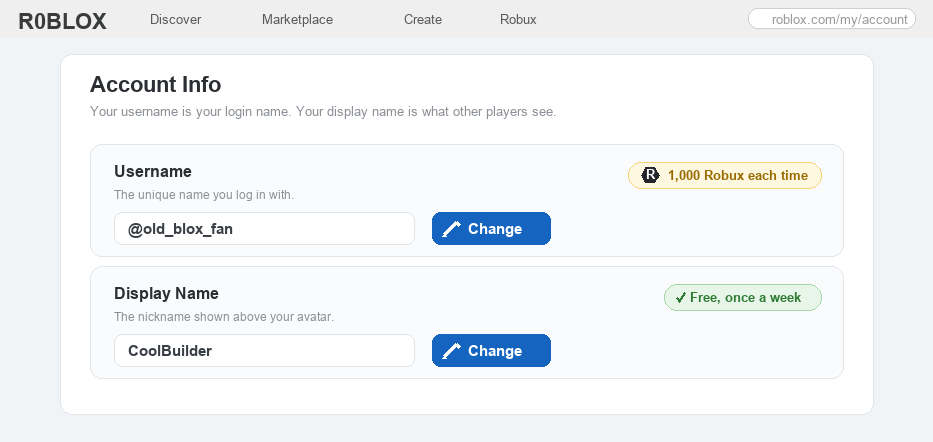
These two get mixed up a lot, so it helps to know the difference before you change anything. Your username is your unique @name, the one you log in with, and only you can have it. Your display name is the friendly nickname floating above your avatar, it is free to change, and other people are allowed to use the same one. The picture below shows them side by side.
How to Change Your Name on Roblox
1
Decide which name you want to change
First, pick which name you actually want to change, because they work very differently.
– Change your display name if you just want a new nickname above your avatar; it is free and quick
– Change your username if you want a brand new @name to log in with; this one costs 1,000 Robux
– Need ideas for a cool new name? Our username generator can help you find one, or browse our 500 username ideas list for hand-picked options.
 Username vs display name at a glance: your username is your unique @login name and costs 1,000 Robux to change, while your display name is a free nickname you can change once a week.
2
Open Settings and go to Account Info
Both names live in the same place, so the first move is always the same.
– Log in, then click the gear icon in the top corner and choose Settings
– Open the Account Info tab; you will see your username and your display name listed there
– This works on the website and in the Roblox app, just look for the same gear and Account Info
3
Change your username (costs 1,000 Robux)
This swaps your @name, the one you use to log in. Make sure you have the Robux first.
– Click the small pencil (Change) next to your username
– Type your new username and your account password to prove it is really you
– Confirm the change; 1,000 Robux is taken from your account each time you do this, so you need at least that much
– You also need a verified email on the account, and the new name has to be one nobody else is using
4
Change your display name (free)
This changes the nickname above your avatar without touching your login name, and it does not cost anything.
– In the same Account Info area, find the Display Name box and click to edit it
– Type the new nickname and save; it updates in games and on your profile right away
– You can only change your display name once every 7 days, so pick one you like
5
Follow the name rules (and stay safe)
Roblox checks every name, so yours has to follow a few simple rules to be allowed.
– A name must be 3 to 20 characters, using letters and numbers, with no spaces (only a single underscore is allowed, in limited cases)
– A username has to be one no one else has; a display name can be the same as someone else’s
– For your safety, never put your real name, age, phone number, or school in either name; pick something fun instead (here is more on staying safe on Roblox)
6
Good things to know before you change
A couple of quick facts so there are no surprises, especially before you spend Robux.
– Changing your name does not delete anything; you keep your items, your games, your friends, and your Robux
– Your old username is saved to your account, so no one else can grab it and you can switch back later by changing again
– After a username change you log in with the new username (your email still works too)
– 1,000 Robux is real money, so it is a smart idea to ask a parent before changing your username
Roblox Username & Display Name FAQ
How much does it cost to change your username on Roblox?
Changing your username costs 1,000 Robux, and you pay that each time you change it, not just once. You need at least 1,000 Robux in your account and a verified email before you can do it.
Is changing your display name free?
Yes. Changing your display name is completely free, and you can do it once every 7 days. Only the username change costs Robux.
What is the difference between a username and a display name?
Your username is your unique @name, the one you log in with, and no one else can have it. Your display name is just the nickname shown above your avatar, it is free to change, and other players are allowed to use the same one.
How often can I change my name?
You can change your username any time you have 1,000 Robux for it. Your display name can only be changed once every 7 days.
Will I lose my items, Robux, or friends if I change my username?
No. Everything stays exactly the same; only your name changes. You keep your items, the games you made, your friends list, and your Robux. Your old username is even saved to your account so no one else can take it.
What are the username rules on Roblox?
A username must be 3 to 20 characters, made of letters and numbers, with no spaces (only a single underscore is allowed, in limited cases), and it cannot be a name someone else already uses. Keep your real name and other personal details out of it to stay safe.
The bottom line
You have two names on Roblox. Your display name is a free nickname you can change once a week in Settings > Account Info, and your username is your unique login name that costs 1,000 Robux to change in the same place. Pick a fun name that keeps your real details private, and ask a parent before spending Robux. For the official rules, see Roblox’s own Help Center.