Roblox Device Guide
What Can You Play Roblox On?
“Every device Roblox works on, whether it is cross-platform, and the one console it is missing.”
Last Checked: August 2026
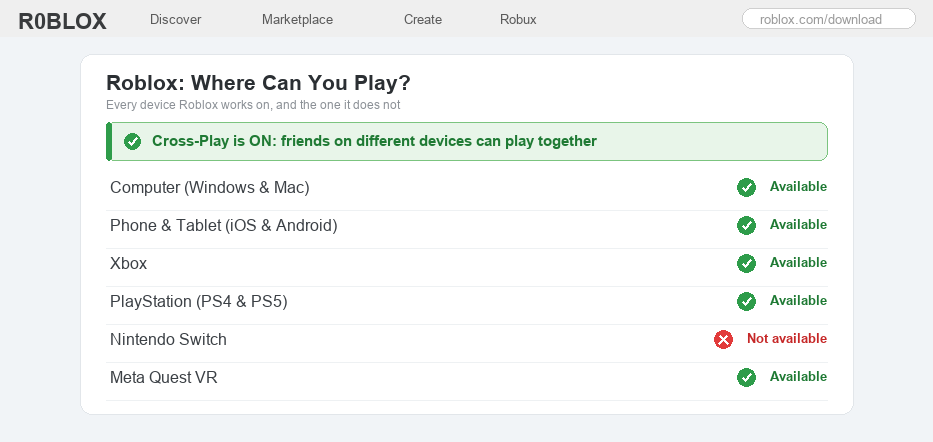
One of the best things about Roblox is that it runs on lots of different devices, so you can play on the screen you already have.
You can play on a computer, on your phone or tablet, on an Xbox, and on a PlayStation. Best of all, your account and your stuff stay the same no matter which one you use.
But Roblox is not on every device. The question players ask the most is whether it works on the Nintendo Switch, and the honest answer surprises a lot of people.
The other big question is about playing together. If you are on a phone and your friend is on an Xbox, can you still be in the same game? The good news there is a happy one.
Well, here is the full list of devices Roblox works on, the one popular device it does not, and how cross-play lets everyone play side by side.
The Quick Answer
You can play Roblox on Windows PC, Mac, iPhone, iPad, Android phones and tablets, Xbox, and PlayStation (both PS4 and PS5). You can even play in VR on a Meta Quest headset. The one popular device Roblox is not on is the Nintendo Switch, since there is no official Roblox app for it yet. And yes, Roblox is fully cross-platform, so friends on different devices can all play together in the same game.
Every Device You Can Play Roblox On
1
Computer: Windows PC and Mac
Roblox works great on a computer, and this is where many players like to build their own games too.
– Get the free Roblox app from the official Roblox website, or play right in a web browser like Chrome or Edge
– It runs on Windows PCs and on Mac computers, and your account is the same on both
– Playing on a Chromebook? We have a full guide for that, since Chromebooks work a little differently
2
Phone and tablet: iPhone, iPad, and Android
Phones and tablets are the most popular way to play Roblox, and the app is free to download.
– On an iPhone or iPad, get Roblox from the App Store; on an Android phone or tablet, get it from the Google Play Store
– Sign in with the same account you use anywhere else, and all your games and items will be there
– Roblox is free, so you never have to pay just to download and play it
3
Xbox
Roblox has its own free app on Xbox, so you can play right on your TV with a controller.
– Get it from the Microsoft Store on an Xbox One, Xbox Series S, or Xbox Series X
– A few features made for chatting work a little differently on a console, but the games are the same
– Sign in with your Roblox account so your avatar and items carry over from your other devices
4
PlayStation: PS4 and PS5
Yes, Roblox is on PlayStation. It arrived on the PlayStation Store back in 2023, and it is free.
– It works on both the PS4 and the PS5, and the two use the same version of Roblox
– Download it from the PlayStation Store, then sign in with your Roblox account
– Just like on Xbox, your games, avatar, and items are the same ones from your other devices
5
Nintendo Switch (the one that is missing)
This is the device people ask about most, and the honest answer is no. There is no official Roblox app for the Nintendo Switch.
– You will not find Roblox in the Nintendo eShop, and Nintendo and Roblox have not announced a Switch version
– Be careful online: some videos promise a secret way to get Roblox on a Switch, but these do not really work and can be unsafe, so it is best to skip them
– If you want to play on a TV, an Xbox or a PlayStation is the way to go for now
6
Is Roblox cross-platform? (yes, everyone plays together)
Here is the happy part. Roblox is fully cross-platform, which means a player on one kind of device can play with a player on a completely different one.
– Someone on a phone can be in the same game as a friend on a PC, an Xbox, or a PlayStation, all at once
– On PlayStation you can even turn cross-play on or off in the Roblox settings if you ever want to
A quick safety reminder: cross-play is a great way to play with friends you already know, but only team up with people you trust. Never share your real name, age, address, school, or passwords with anyone online, no matter how friendly they seem.
Roblox Devices FAQ
Can you play Roblox on the Nintendo Switch?
No, not officially. There is no Roblox app in the Nintendo eShop, and neither Nintendo nor Roblox has announced a Switch version. If you want to play on a TV, an Xbox or a PlayStation will work instead. Be wary of online videos that claim there is a secret way, as they are usually not real or not safe.
Is Roblox on PS4 and PS5?
Yes. Roblox came to the PlayStation Store in 2023, and it works on both the PS4 and the PS5. It is free to download, and you sign in with the same Roblox account you use on your other devices.
Is Roblox cross-platform?
Yes, Roblox is fully cross-platform. Players on a phone, tablet, computer, Xbox, or PlayStation can all join the same game and play together at the same time, because Roblox uses the same account and the same games across every device.
Can PC, console, and phone players all play together?
Yes. A friend on a PC, a friend on an Xbox, a friend on a PlayStation, and a friend on a phone can all be in one game together. On PlayStation there is also a setting to turn cross-play on or off if you ever want to.
Can you play Roblox in VR?
Yes. You can play Roblox in virtual reality on a Meta Quest headset, and certain games are made to feel even better in VR. Not every game supports VR, but a lot of popular ones do.
What is the best device to play Roblox on?
The best device is simply the one you already have, since Roblox plays well on all of them. A computer is handy if you want to build your own games, a phone or tablet is easy to take anywhere, and an Xbox or PlayStation is great on the big TV. Whatever you pick, keep the app up to date so everything runs smoothly.
Good to know
Roblox is always free to download, so you never pay just to start playing on any device. You can see the official list of supported devices and download links over at Roblox Support. Whichever device you choose, keep Roblox up to date so your games load fast and cross-play with your friends works without a hitch.