Pirates Dream Script
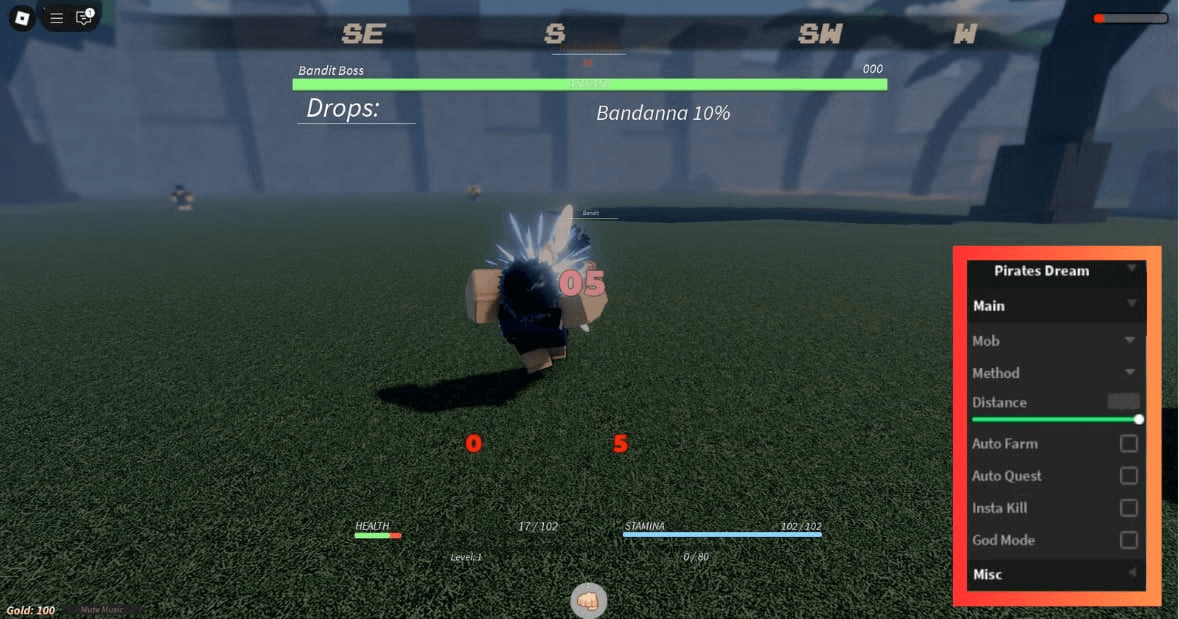
Pirates Dream is a pirate-themed game where the grind for better gear, stronger abilities, and more power never really slows down. Every upgrade requires more resources than the last, and farming them manually takes a serious amount of time. These scripts take over the hard parts with Auto Quest, Auto Farm, Pastebin so your progression keeps moving even when you step away.

 3 working scripts
loadstring(game:HttpGet(('https://raw.githubusercontent.com/XTheMasterX/Scripts/Main/PiratesDream'),true))()Pirates Dream Scripts (Auto Quest, Auto Farm, Pastebin & More)
To run any of these scripts you will need a working Roblox executor. Check out the list at that link for free and paid options that work in 2026.
Pirates Dream Script Auto Farm, Auto Quests, Auto Collect, Kill Aura, More Method
Pirates Dream Script Auto Farm, Auto Quests, Auto Collect, Kill Aura, More Method
loadstring(game:HttpGet(('https://raw.githubusercontent.com/XTheMasterX/Scripts/Main/PiratesDream'),true))()Pirates Dream Auto Farm & Auto Collect Script:
Pirates Dream Auto Farm & Auto Collect Script:
loadstring(game:HttpGet("https://raw.githubusercontent.com/Fortcampbell123/one-p/main/script"))()Pirates Dream Script Pastebin2026 :
Pirates Dream Script Pastebin2026 :
local b = "Palm Island" -- change to your island name
local a = 1 -- change to what number rock u want to farm


local PirateSimulator = Instance.new("ScreenGui")
local Main = Instance.new("Frame")
local Title = Instance.new("TextLabel")
local Title_2 = Instance.new("TextLabel")
local KillAll = Instance.new("TextButton")
local AF = Instance.new("TextButton")
--Properties:
PirateSimulator.Name = "PirateSimulator"
PirateSimulator.Parent = game.Players.LocalPlayer:WaitForChild("PlayerGui")

Main.Name = "Main"
Main.Parent = PirateSimulator
Main.BackgroundColor3 = Color3.new(0, 0, 0)
Main.Position = UDim2.new(0.221798778, 0, 0.178470254, 0)
Main.Size = UDim2.new(0, 586, 0, 433)

Title.Name = "Title"
Title.Parent = Main
Title.BackgroundColor3 = Color3.new(1, 1, 1)
Title.BackgroundTransparency = 1
Title.Size = UDim2.new(0, 586, 0, 50)
Title.Font = Enum.Font.Code
Title.Text = "Pirate Simulator"
Title.TextColor3 = Color3.new(1, 1, 1)
Title.TextScaled = true
Title.TextSize = 14
Title.TextWrapped = true

Title_2.Name = "Title"
Title_2.Parent = Main
Title_2.BackgroundColor3 = Color3.new(1, 1, 1)
Title_2.BackgroundTransparency = 1
Title_2.Position = UDim2.new(0, 0, 0.115473442, 0)
Title_2.Size = UDim2.new(0, 586, 0, 108)
Title_2.Font = Enum.Font.Code
Title_2.Text = "Scripts and gui made by Poki Hero"
Title_2.TextColor3 = Color3.new(1, 1, 1)
Title_2.TextScaled = true
Title_2.TextSize = 14
Title_2.TextWrapped = true

KillAll.Name = "KillAll"
KillAll.Parent = Main
KillAll.BackgroundColor3 = Color3.new(0.458824, 0.458824, 0.458824)
KillAll.BorderSizePixel = 0
KillAll.Position = UDim2.new(0, 0, 0.401847571, 0)
KillAll.Size = UDim2.new(0, 200, 0, 50)
KillAll.Font = Enum.Font.Code
KillAll.Text = "Kill All"
KillAll.TextColor3 = Color3.new(0, 0, 0)
KillAll.TextScaled = true
KillAll.TextSize = 14
KillAll.TextWrapped = true

AF.Name = "AF"
AF.Parent = Main
AF.BackgroundColor3 = Color3.new(0.458824, 0.458824, 0.458824)
AF.BorderSizePixel = 0
AF.Position = UDim2.new(0.658703089, 0, 0.401847541, 0)
AF.Size = UDim2.new(0, 200, 0, 50)
AF.Font = Enum.Font.Code
AF.Text = "Auto Farm"
AF.TextColor3 = Color3.new(0, 0, 0)
AF.TextScaled = true
AF.TextSize = 14
AF.TextWrapped = true
Main.Active = true
Main.Draggable = true
KillAll.MouseButton1Click:Connect(function()
	while wait() do
	for i , v in pairs(game.Players:GetChildren()) do
		if v.Name ~= game.Players.LocalPlayer.Name then
			if v.Character.Humanoid.Health ~= 0 then
				local a = game.Players.LocalPlayer
				local b = a.Character.HumanoidRootPart
				b.CFrame = v.Character.HumanoidRootPart.CFrame
				local A_1 = "Hit"
				local A_2 =
				{
					[1] =
				{
					[1] = game:GetService("Workspace")[v.Name].Humanoid,
					[2] = game:GetService("Workspace")[v.Name].LowerTorso
				}
				}
				local A_3 = game:GetService("Workspace")[a.Name].HumanoidRootPart
				local Event = game:GetService("ReplicatedStorage").ReplicationManagers.HitPlayer
				Event:FireServer(A_1, A_2, A_3)
				Event:FireServer(A_1, A_2, A_3)
				Event:FireServer(A_1, A_2, A_3)
				Event:FireServer(A_1, A_2, A_3)
				Event:FireServer(A_1, A_2, A_3)
				Event:FireServer(A_1, A_2, A_3)
				Event:FireServer(A_1, A_2, A_3)

			end
		end
	end
end

end)
AF.MouseButton1Click:Connect(function()

while wait() do
	local A_1 = "Hit"
	game.Players.LocalPlayer.Character.HumanoidRootPart.CFrame =  game:GetService("Workspace").ResourceIslands["Crescent Island"].Resources.Rocks:FindFirstChild("Rock"..a).Rock.CFrame		local A_2 = game:GetService("Workspace").ResourceIslands["Crescent Island"].Resources.Rocks:FindFirstChild("Rock"..a)
	local Event = game:GetService("ReplicatedStorage").ReplicationManagers.HitResource		Event:FireServer(A_1, A_2)
	local A_1 = "UnloadCargo"
	wait(0.2)
	game.Players.LocalPlayer.Character.HumanoidRootPart.CFrame = game.Workspace.Islands[b].Jerri.HumanoidRootPart.CFrame
	local A_2 = game:GetService("Workspace").Islands[b].Jerri
	local Event = game:GetService("ReplicatedStorage").ReplicationManagers.JerriRE
	Event:FireServer(A_1, A_2)
end
end)How to Use the Pirates Dream Script
Copy a script from the list above first, then follow these in order.
- 01
Get a working executor - see our Roblox Executor list for free options on PC, Mobile, and Mac.
- 02
Launch Roblox and open Pirates Dream.
- 03
Open your executor, then click Inject or Attach.
- 04
Copy any script above and paste it into the executor script box.
- 05
Press Execute - the GUI will appear in-game.
- 06
Toggle Auto Farm, Speed Hack, ESP and other features from the GUI menu.
- 07
Always use an alt account to protect your main.
About The Pirates Dream Script
Pirates Dream is a pirate-themed Roblox game where the grind for better gear, stronger devil fruit abilities, and higher stats never really slows down. Every tier of progression requires more farming than the last, and doing it all manually across multiple sessions adds up fast.
The auto farm and auto dungeon scripts are the biggest time-savers here since they keep your resources and stats climbing without any input. Add inf gem or auto sell on top and your currency never runs dry.
Always run these on an alt to keep your main account safe. The hubs in the list above push updates after game patches so check back here if one stops working.
Looking for free rewards? Check out our Pirates Dream Codes page for every working code.
The Pirates Dream covers the full map layout, ability tiers, and patch history if you want to dig into the mechanics beyond what the script handles.
All scripts on this page are for educational purposes only. Using scripts in Roblox violates the Roblox Terms of Service and may result in your account being permanently banned or suspended without warning. RobloxDatabase.com is not responsible for any consequences from using these scripts. Always use an alt account - never your main.