Infinite Tower Tycoon Script
Infinite Tower Tycoon is a tycoon game where building up your empire takes a lot of time and consistent attention to keep the income flowing. Progress slows down significantly if you are not actively managing everything, and the early stages especially drag without help. These scripts automate the whole operation with Pastebin so your tycoon keeps growing whether you are watching or not.

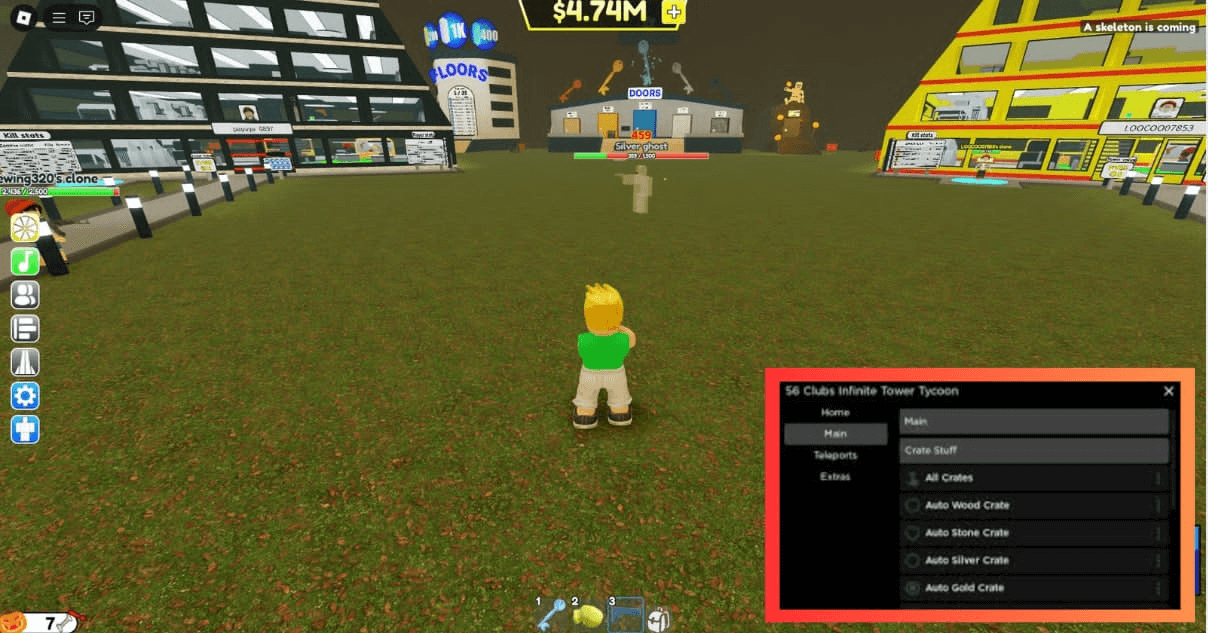 2 working scripts
loadstring(game:HttpGet("https://raw.githubusercontent.com/WinterDinder/Infinite-Tower-Simulator/main/Main", true))()Infinite Tower Tycoon Scripts (Pastebin & More)
To run any of these scripts you will need a working Roblox executor. Check out the list at that link for free and paid options that work in 2026.
Infinite Tower Tycoon Script Pastebin 2026:
Infinite Tower Tycoon Script Pastebin 2026:
loadstring(game:HttpGet("https://raw.githubusercontent.com/WinterDinder/Infinite-Tower-Simulator/main/Main", true))()Infinite Tower Tycoon Script Pastebin2026 :
Infinite Tower Tycoon Script Pastebin2026 :
-- Discord:Bulze#9477

getgenv().autotap = false;
getgenv().autoreb = false;
getgenv().autoap = false;

local library = loadstring(game:HttpGet(('https://raw.githubusercontent.com/bloodball/-back-ups-for-libs/main/wall%20v3')))()

local w = library:CreateWindow("Inf Tower Game")

local b = w:CreateFolder("Auto Farm")

local c = w:CreateFolder("Misc")

local d = w:CreateFolder("Destroy")

local customHpValue = 100
local selectedPlayer = nil
local selectedPlayerToKill = nil


local function setCustomHp(value)
    customHpValue = value
    print("Custom HP set to: " .. customHpValue)
end

b:Toggle("Free Cash", function(bool)
    getgenv().autoreb = bool
    print("Free Cash: " .. tostring(bool))
    if bool then
        doreb();
    end
end)

b:Button("Kill All", function()
    local player = game.Players.LocalPlayer
    local timewait = 0

    for _, v in pairs(game.Players:GetPlayers()) do
        if v.Name ~= player.Name then
            pcall(function()
                print(v)

                local character = v.Character
                if character then
                    local A_1 = character
                    local A_2 = 9999999999
                    local A_3 = 0
                    local Event = game:GetService("ReplicatedStorage").Tools.ToolEvent.PunchEvent
                    Event:FireServer(A_1, A_2, A_3)
                end
            end)
        end
        wait(0.01)
    end
end)

c:Button("Simple inf Jump", function()
    local InfiniteJumpEnabled = true
    game:GetService("UserInputService").JumpRequest:connect(function()
        if InfiniteJumpEnabled then
            game:GetService("Players").LocalPlayer.Character:FindFirstChildOfClass('Humanoid'):ChangeState("Jumping")
        end
    end)
end)


c:Box("Set Custom HP", "number", function(value)
    setCustomHp(value)
end)


local playerList = {}
for _, player in pairs(game.Players:GetPlayers()) do
    table.insert(playerList, player.Name)
end


c:Dropdown("Select Player", playerList, true, function(selected)
    selectedPlayer = game.Players:FindFirstChild(selected)
    print("Selected Player for HP customization: " .. selected)
end)


c:Button("Apply Custom HP", function()
    if selectedPlayer and selectedPlayer.Character then
        local A_1 = selectedPlayer.Character
        local A_2 = -customHpValue
        local A_3 = 0
        local Event = game:GetService("ReplicatedStorage").Tools.ToolEvent.PunchEvent
        Event:FireServer(A_1, A_2, A_3)
        print("Custom HP applied: " .. customHpValue .. " to " .. selectedPlayer.Name)
    end
end)


c:Dropdown("Select Player to Kill", playerList, true, function(selected)
    selectedPlayerToKill = game.Players:FindFirstChild(selected)
    print("Selected Player to Kill: " .. selected)
end)


c:Button("Kill Custom Player", function()
    if selectedPlayerToKill and selectedPlayerToKill.Character then
        local A_1 = selectedPlayerToKill.Character
        local A_2 = math.huge
        local A_3 = 0
        local Event = game:GetService("ReplicatedStorage").Tools.ToolEvent.PunchEvent
        Event:FireServer(A_1, A_2, A_3)
        print("Killed: " .. selectedPlayerToKill.Name)
    end
end)

d:DestroyGui()

function doreb()
    spawn(function()
        while getgenv().autoreb == true do
            local A_1 = "wooden crate"
            local Event = game:GetService("ReplicatedStorage").FirstPlayEvent
            Event:FireServer(A_1)
            wait(0.02)
        end
    end)
end

while true do
    wait(5)
    game.Players.LocalPlayer.Character.Humanoid.WalkSpeed = 100
end

print("test")How to Use the Infinite Tower Tycoon Script
Copy a script from the list above first, then follow these in order.
- 01
Get a working executor - see our Roblox Executor list for free options on PC, Mobile, and Mac.
- 02
Launch Roblox and open Infinite Tower Tycoon.
- 03
Open your executor, then click Inject or Attach.
- 04
Copy any script above and paste it into the executor script box.
- 05
Press Execute - the GUI will appear in-game.
- 06
Toggle Auto Farm, Speed Hack, ESP and other features from the GUI menu.
- 07
Always use an alt account to protect your main.
About The Infinite Tower Tycoon Script
Infinite Tower Tycoon is a tycoon game where building your operation up from nothing requires consistent time and attention to keep everything running efficiently. Progress slows down hard in the mid game when the upgrade costs start stacking and income is not keeping up.
Auto farm and automation scripts are the most valuable here since they keep your income flowing and upgrades ticking over without you needing to manage everything manually. Set one up and your tycoon keeps growing on its own.
Run these on an alt account to stay safe. Check back here after game updates since tycoon mechanics and income rates can change in ways that affect the automation.
All scripts on this page are for educational purposes only. Using scripts in Roblox violates the Roblox Terms of Service and may result in your account being permanently banned or suspended without warning. RobloxDatabase.com is not responsible for any consequences from using these scripts. Always use an alt account - never your main.