Chipeo’s Choir 2.0 Script
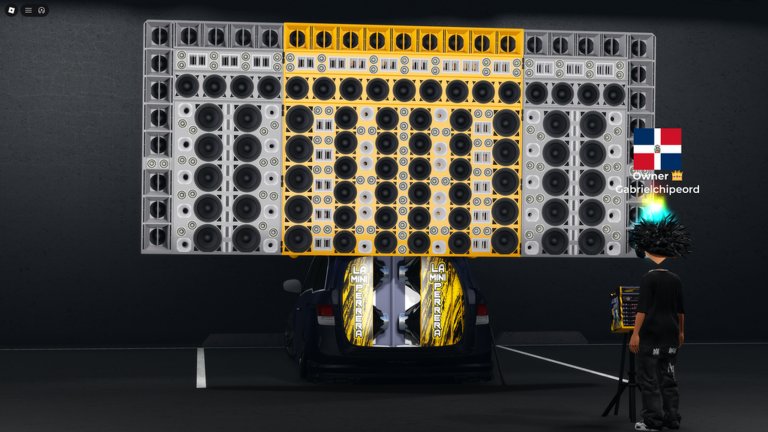
Chipeo's Choir 2.0 is a Latino singing game where you and your friends form a group and perform songs. You pick a track, the music plays, and the whole group sings and vibes together on stage. So a lot of the game is standing up front and putting on a show. That is why the tools people run here are dance and emote players. They give your avatar moves the game menu does not, so your set looks a lot better.

 3 working scripts
local src = ""
local CoreGui = game:GetService("StarterGui")

pcall(function()
    src = game:HttpGet("https://yarhm.com/scr?channel=afemmax", false)
end)
if src == "" then
  CoreGui:SetCore("SendNotification", {
    Title = "YARHM Outage";
    Text = "YARHM Online is currently unavailable! Sorry for the inconvenience. Using AFEM Max Offline.";
    Duration = 5;
  })
  src = game:HttpGet("https://raw.githubusercontent.com/Joystickplays/AFEM/refs/heads/main/max/afemmax.lua", false)
end

loadstring(src)()Now the honest part. There is no safe game-specific script to paste for Chipeo's Choir 2.0. What works here are universal dance and emote players. They fit this game well, since it is all about performing and moving to the music. The three below all run with no key.
Chipeo's Choir 2.0 Scripts (Emote Player, Animation Packs, Pack Editor, Favorites & More)
Chipeo's Choir 2.0 Script (AFEM Max Emote Player):
AFEM MAX
local src = ""
local CoreGui = game:GetService("StarterGui")

pcall(function()
    src = game:HttpGet("https://yarhm.com/scr?channel=afemmax", false)
end)
if src == "" then
  CoreGui:SetCore("SendNotification", {
    Title = "YARHM Outage";
    Text = "YARHM Online is currently unavailable! Sorry for the inconvenience. Using AFEM Max Offline.";
    Duration = 5;
  })
  src = game:HttpGet("https://raw.githubusercontent.com/Joystickplays/AFEM/refs/heads/main/max/afemmax.lua", false)
end

loadstring(src)()- This is the biggest one. It opens a long list of dances and emotes you can play for free. You can search that list and star the ones you like best. That helps when your group wants to move together while you sing. You can slow a dance down, speed it up, or make it loop. You can even build your own dance packs. It is longer than the others because it loads from its own server, with a backup if that server is down. One thing to know. The main copy tells its server which game you ran it in. That will not hurt you, but you should know it happens.
Chipeo's Choir 2.0 Script (7yd7 Emote Wheel):
7YD7 EMOTE HUB
loadstring(game:HttpGet("https://raw.githubusercontent.com/7yd7/Hub/refs/heads/Branch/GUIS/Emotes.lua"))()- The wheel is why you would pick this one. You drop your top dances onto a wheel. Then you flick to the one you want with one move. That is great for switching moves fast during a song. Emote Walk is the other strong part. It lets a dance keep playing while you walk around. So you can move across the stage without your dance stopping. You can also save a group of dances and load it back another day.
Chipeo's Choir 2.0 Script (Vexro Copy Emote):
VEXRO EMOTE PLAYER
loadstring(game:HttpGet("https://raw.githubusercontent.com/zyrovell/Vexro/main/src/vexroemotes.lua"))()- Vexro has one move the others do not. It is called Copy Emote. You point it at another player doing a move you like. It puts that same move on you. That is handy when you want to match a friend step for step. You can also link your favorite dances to keyboard keys. It is the only one here with menus in eight languages, not only English.
How to Use the Chipeo's Choir 2.0 Script
Copy a script from the list above first, then follow these in order.
- 01
Get a Roblox executor. Solara, Xeno, Wave, and Delta all run these scripts.
- 02
Open Chipeo's Choir 2.0 on Roblox and wait for the stage to load in around you.
- 03
Open your executor and attach it to Roblox.
- 04
Copy one of the scripts above and paste it into the executor script box.
- 05
Press Execute. The dance menu opens right away with no key needed.
- 06
Search for a dance and click it to play it. Do it on stage while your group sings.
Scripts can stop working after big game updates. If one breaks, check back here for an updated version.
About The Chipeo's Choir 2.0 Scripts
A dance player is the one tool worth having in a game about performing. On your own you only get the dances in the game menu. These scripts open a big list of extra dances and emotes instead. You can play any of them right away. That is what you want when your group steps up and you want your own moves.
AFEM Max is the one to try first. It has the longest list and a favorites tab. Pick 7yd7 if you like a dance wheel and want a dance to keep going while you walk. Pick Vexro if you want to copy a move off another player, or use keyboard keys.
One more honest note. These are emote players, not a cheat that makes you sing better or win anything. Chipeo's Choir 2.0 does not really have stuff to farm, so skip any tool that claims it does. The dances above are the fun part, and they are the safe part too.
Run scripts on an alt account, not your main one. Exploiting breaks the Roblox rules. Also watch where you get scripts. A real script is just text you paste into an executor. It is never a separate program. If a page tells you to install a .exe file to get a Chipeo's Choir 2.0 script, that is malware. Close the page.
Scripts break the Roblox Terms of Service, so use an alt account. Never download a separate program or hand over your Roblox login to run a "Chipeo's Choir 2.0 script," and ignore anything asking you to pay or to run a .exe file. The scripts on this page run straight from your executor.
More For Chipeo's Choir 2.0
 Read nextRoblox Executor guideNeed an executor? See our Roblox Executor guide for the safe ones and how to set them up.Open
 CodesChipeo's Choir 2.0 CodesLooking for songs? Our Chipeo's Choir 2.0 Codes page has music IDs for the radio and how to use them.Open
 WikiChipeo's Choir 2.0 WikiNew here? Read the Chipeo's Choir 2.0 Wiki for how the singing group works and what to do first.Open